# The basic scalar types used in grade-predictor
from __future__ import annotations # enables newer type syntax on Python 3.10+Chapter 21: Type annotations


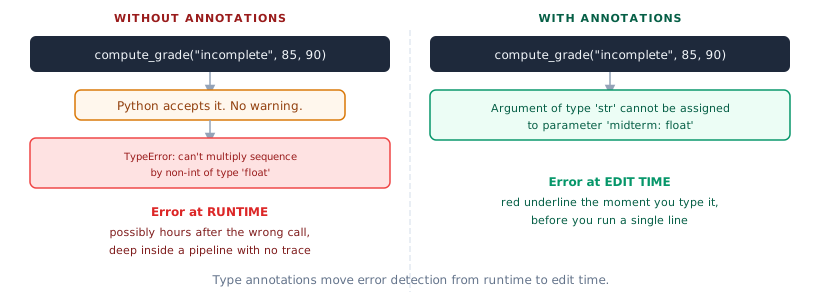
Your grade-predictor pipeline has been linted with Ruff and its style is consistent. But there is a failure Ruff cannot catch: you call compute_grade("incomplete", 85, 90) and the function accepts it. Python does not complain. The string multiplies by 0.30, produces a concatenation, and the computation crashes three function calls later with a message that does not point back to the original mistake.
The problem is intent: the function expects a float, the caller passed a string, and nothing in the code communicates that mismatch until runtime.
Type annotations are that communication. Annotate compute_grade(midterm: float, final: float, project: float) -> float: and the IDE flags the wrong call the moment you type it. The error moves from a 2 am production crash to a red underline at edit time.
Pydantic in Chapter 25 enforces these contracts at runtime when external data arrives. Type annotations are their static-time complement.
The diagram below shows the key shift: without type annotations, a wrong argument reaches the function and fails at runtime with a cryptic error; with them, the IDE underlines the mistake the moment you type it.
1. Why Type Annotations Matter
Two versions of the same function:
# Without annotations
def compute_grade(midterm, final, project, weights):
    ...

# With annotations
def compute_grade(
    midterm: float,
    final: float,
    project: float,
    weights: tuple[float, float, float] = (0.30, 0.45, 0.25),
) -> float:
    ...
The annotated version is self-documenting: any editor with a type checker installed will warn you the moment you pass "82" instead of 82.0. The unannotated version silently computes "82" * 0.30 = "82828282828282828282828282828282828282828282828282828282828282". That is a real Python behavior, not a hypothetical.
Python does not enforce annotations at runtime. That is the job of a static type checker. The annotation is documentation that a machine can check.
Key Concept: Annotations are documentation a machine can check
They tell collaborators and your future self what a function expects and returns, without writing a word of prose. A type checker like ty reads them and flags type mismatches before the code runs.
2. Basic Annotations
Annotate the function with return type and parameter types. The IDE now knows midterm must be float:
def compute_grade(
    midterm: float,
    final: float,
    project: float,
    weights: tuple[float, float, float] = (0.30, 0.45, 0.25),
) -> float:
    if abs(sum(weights) - 1.0) > 0.001:
        raise ValueError(f"weights must sum to 1, got {sum(weights):.3f}")
    return midterm * weights[0] + final * weights[1] + project * weights[2]
Call it with valid values to confirm the annotation does not change behaviour:
compute_grade(80.0, 85.0, 90.0)84.75Python runs compute_grade("82", 85.0, 90.0) without raising an error. The annotation is a contract, not a runtime check:
# Python does NOT enforce annotations at runtime
# The annotation says midterm: float, but we pass str: Python does not catch this
try:
    result = compute_grade("82", 85.0, 90.0)
    print(result)
except TypeError as e:
    print(f"TypeError (not from the annotation): {e}")
TypeError (not from the annotation): can't multiply sequence by non-int of type 'float'The full set of basic types used in DS function signatures:
| Type | Use for |
|---|---|
int |
counts, indices |
float |
scores, rates, measurements |
str |
labels, column names, IDs |
bool |
flags, binary outcomes |
int or float |
either, when both are valid |
float or None |
an optional numeric value |
list[float] |
a sequence of floats |
tuple[float, float, float] |
a fixed-length sequence |
dict[str, float] |
a mapping from string keys to float values |
def grade_to_letter(average: float) -> str:
    if average >= 85:
        return "A"
    elif average >= 70:
        return "B"
    elif average >= 55:
        return "C"
    elif average >= 45:
        return "D"
    return "F"


def flag_at_risk(score: float | None, threshold: float = 50.0) -> bool:
    if score is None:
        return True  # missing score is treated as at-risk
    return score < threshold


def grade_summary(midterm: float, final: float, project: float) -> dict[str, float]:
    avg = compute_grade(midterm, final, project)
    return {"average": avg, "midterm": midterm, "final": final, "project": project}


grade_summary(80.0, 85.0, 90.0)
{'average': 84.75, 'midterm': 80.0, 'final': 85.0, 'project': 90.0}
Activity 1: annotate Three Functions
Annotate these three signatures. Include one with a
Annotate these three signatures. Include one with a
float | None parameter for a nullable score, one that returns dict[str, float], and one that takes a list[str] of column names.
def normalize_score(raw, min_val, max_val): ...
def compute_cohort_summary(scores): ...          # returns dict
def select_columns(df, columns): ...             # columns is list[str]
# TODO: annotate the three functions
...
3. Annotating numpy Arrays and pandas DataFrames
This is the gap in most Python type annotation tutorials. DS code is full of numpy arrays and pandas DataFrames, and the annotations for them are not obvious.
For numpy, use NDArray from numpy.typing:
import numpy as np
from numpy.typing import NDArray
import pandas as pd
NDArray[np.float64] tells both the type checker and the reader that normalize expects a 2D matrix of 64-bit floats, not a list or a generic array:
def normalize(X: NDArray[np.float64]) -> NDArray[np.float64]:
    mean = X.mean(axis=0)
    std = X.std(axis=0)
    return (X - mean) / std
Pass a 2D array of scores. The type checker confirms the call is valid before it runs:
# NDArray[np.float64] is a typed array: a 2D matrix of 64-bit floats
scores = np.array([[80.0, 85.0, 90.0], [70.0, 75.0, 80.0]])
normalize(scores)
array([[ 1., 1., 1.],
[-1., -1., -1.]])For pandas, pd.DataFrame is the practical annotation, even though it carries no column-level information:
def add_average_marks(df: pd.DataFrame) -> pd.DataFrame:
    df = df.copy()
    df["average_marks"] = (df["midterm_score"] + df["final_score"] + df["project_score"]) / 3
    return df


def flag_at_risk_series(df: pd.DataFrame, threshold: float = 50.0) -> pd.Series:
    return df["average_marks"] < threshold


# Create a sample DataFrame to test
sample = pd.DataFrame(
    {
        "student_id": ["S0001", "S0002"],
        "midterm_score": [80.0, 60.0],
        "final_score": [85.0, 55.0],
        "project_score": [90.0, 65.0],
    }
)
result = add_average_marks(sample)
result| student_id | midterm_score | final_score | project_score | average_marks | |
|---|---|---|---|---|---|
| 0 | S0001 | 80.0 | 85.0 | 90.0 | 85.0 |
| 1 | S0002 | 60.0 | 55.0 | 65.0 | 60.0 |
Pro Tip: pd.DataFrame is practical; pandera adds column types
pd.DataFrame is a useful annotation even though it carries no column information. The next step is pandera.typing.DataFrame[Schema], which encodes column names and dtypes at the type level. Start with pd.DataFrame and graduate to pandera when you need column-level guarantees in a data pipeline.
Activity 2: annotate Array and DataFrame Functions
Write and annotate two functions: one that takes
Write and annotate two functions: one that takes
NDArray[np.float64] and returns a normalized array, and one that takes a pd.DataFrame and returns a filtered pd.DataFrame. Confirm both run correctly on the sample DataFrame above.
def normalize_features(X: NDArray[np.float64]) -> NDArray[np.float64]: ...
def filter_passing(df: pd.DataFrame, threshold: float = 50.0) -> pd.DataFrame: ...
# TODO: write and annotate the two functions
...
4. TypeAlias and Protocol
When the same complex type appears in many function signatures, give it a name. In Python 3.12, the type keyword creates a type alias clearly and without imports:
type ScoreVector = list[float]
type GradeMap = dict[str, str]  # student_id -> letter grade
type WeightTuple = tuple[float, float, float]


def batch_compute_grades(
    score_rows: list[ScoreVector],
    weights: WeightTuple = (0.30, 0.45, 0.25),
) -> GradeMap:
    results = {}
    for i, (midterm, final, project) in enumerate(score_rows):
        avg = compute_grade(midterm, final, project, weights)
        results[f"S{i + 1:04d}"] = grade_to_letter(avg)
    return results


batch_compute_grades([[80.0, 85.0, 90.0], [55.0, 60.0, 58.0]])
{'S0001': 'B', 'S0002': 'C'}Protocol is for duck-typed objects. Instead of importing a specific class, you describe the interface you need:
from typing import Protocol


class Predictor(Protocol):
    def predict(self, X: NDArray[np.float64]) -> NDArray[np.float64]: ...
    def fit(self, X: NDArray[np.float64], y: NDArray[np.float64]) -> None: ...


def evaluate(model: Predictor, X_test: NDArray[np.float64], y_test: NDArray[np.float64]) -> float:
    predictions = model.predict(X_test)
    return float(np.mean((predictions - y_test) ** 2) ** 0.5)  # RMSE


# Any sklearn-compatible model satisfies Predictor without importing sklearn
print("Predictor protocol defined")
Predictor protocol defined Key Concept: Protocol over import
evaluate(model: Predictor, …) accepts any object with predict and fit methods: sklearn’s LinearRegression, XGBRegressor, a custom class. No import of sklearn needed in the type signature. This is structural subtyping, and it keeps your utility functions independent of any specific ML library.
5. Running ty
Install ty and run it on the grade-predictor source:
uv add --optional dev ty
uv run ty check src/
Reading the output: each line is file:line:col: error[code] message. Errors must be fixed. Warnings are suggestions.
Common errors in DS code:
# Simulate what ty would flag:

# 1. Return type mismatch
def get_threshold() -> float:
    return "50.0"  # str, not float: ty flags this


# 2. Argument type mismatch
def double_score(score: float) -> float:
    return score * 2


result = double_score("82")  # str passed as float: ty flags this


# 3. Optional not handled
def safe_grade(score: float | None) -> str:
    return grade_to_letter(score)  # score might be None: ty flags this


# Correct version
def safe_grade_fixed(score: float | None) -> str:
    if score is None:
        return "N/A"
    return grade_to_letter(score)


safe_grade_fixed(None)'N/A'Configure ty in pyproject.toml:
[tool.ty]
python-version = "3.12"
The --ignore-missing-imports flag suppresses errors from third-party packages that lack type stubs. Pandas stubs are partial; great-tables has no stubs. Use it when third-party noise hides real errors in your own code.
Activity 3: run ty and Fix Errors
Add full type annotations to
Add full type annotations to
core.py. Run uv run ty check src/. Fix every error (not warning) that ty reports in your own code. Confirm the output is clean before moving on.
uv run ty check src/
# Fix each error line by line
uv run ty check src/  # should report 0 errors
# TODO: annotate core.py fully and run ty check6. Gradual Typing: Where to Start
You do not need to annotate everything at once. Gradual typing means adding annotations incrementally, in the order that buys the most value.
Priorities for a DS codebase: 1. Public function signatures first: what callers see 2. Return types before argument types: return type mismatches catch more bugs 3. Skip internal helpers and one-off notebook cells initially 4. Use Any as a placeholder when you need to annotate something complex you will refine later
Any is not giving up. It is a marker that says: this is unannotated, I know it, I will return to it.
from typing import Any


# Acceptable as a placeholder during gradual annotation
def process_raw_data(data: Any) -> pd.DataFrame:
    # Will be refined once the input schema is settled
    return pd.DataFrame(data)


# The same function with a more specific type once the schema is known
def process_records(data: list[dict[str, Any]]) -> pd.DataFrame:
    return pd.DataFrame(data)


# Test both
process_records([{"student_id": "S0001", "midterm_score": 80.0}])| student_id | midterm_score | |
|---|---|---|
| 0 | S0001 | 80.0 |
Common Mistake: Annotating everything at once
Trying to annotate a 2000-line codebase in a single session produces two outcomes: you give up halfway, or you annotate things badly and introduce incorrect type information that misleads the checker. Start with the five most-called public functions. Get them clean. Move on.
Capstone: Fully Annotate core.py
Bring the grade-predictor/src/grade_predictor/core.py to zero type errors.
Capstone - Zero ty Errors
-
Annotate every function in
core.py:compute_grade,grade_to_letter,flag_at_risk,add_average_marks -
Use
NDArray[np.float64]for any numpy array parameters -
Use
pd.DataFrameandpd.Seriesfor pandas types -
Run
uv run ty check src/and bring it to zero errors -
Commit:
git commit -m “feat(types): fully annotate core.py”
uv run ty check src/
# Fix all errors
uv run ty check src/  # zero errors
# TODO: annotate core.py and confirm zero ty errors
...
Further reading
| Resource | Why it matters |
|---|---|
| ty documentation | Astral’s type checker, integrated with the uv/ruff toolchain |
| numpy.typing reference | NDArray and array annotation reference |
| ty documentation | Astral type checker; authoritative reference for ty errors and configuration |
| PEP 544, Protocols | The spec behind structural subtyping |
| pandas type stubs | Official stubs for IDE-level type inference on DataFrames |
Summary
| Concept | Key rule |
|---|---|
| Runtime vs static | Python does not enforce annotations at runtime. A type checker does. |
NDArray[np.float64] |
The correct annotation for a typed numpy array |
pd.DataFrame |
Practical but untyped at the column level. Pandera adds column types. |
type ScoreVector = ... |
Name a complex type you repeat in three or more places (Python 3.12 type keyword) |
Protocol |
Accept any object with a given method, without importing its concrete class |
| Gradual typing | Start with public function signatures. Use Any as a placeholder, not a cop-out. |
Next: Chapter 22: Git and GitHub versions the typed, clean codebase you have here.