Chapter 19: Project setup with uv
You share a Jupyter notebook with a colleague. They clone the repo and run it. The first import fails. Same code, different machine, different packages. You spend 45 minutes on versions before they ever see what the notebook does.
The problem is not the code. The problem is that the environment is implicit: it exists in your head, not in the repository. Without a tool that captures and reproduces the exact set of packages that worked, the only guarantee you can offer is “it works on my machine.”
Virtual environments solve isolation. Lockfiles solve reproducibility. Until recently, you needed separate tools for each: pip and venv for isolation, pip-tools or Poetry for locking. uv does both in one binary, 10 to 100 times faster than pip.
The grade-predictor project you build here runs through every remaining dev-tools chapter: Ruff lints it, git versions it, pytest tests it.
Next: Chapter 20: Code quality with Ruff lints the codebase you build here.

0. What is uv and why use it
Ask five Python developers how they manage dependencies and you’ll get five different answers. Some use pip and venv. Some use Poetry. Some use conda. None of them produce the same environment reliably on a colleague’s machine. uv is the answer to that fragmentation: one tool, one configuration file, one command prefix.
uv is a Python package and project manager written in Rust, built by Astral, the same team behind ruff. It replaces a stack of tools that most Python developers use separately: pip, venv, pip-tools, and parts of Poetry or conda. One binary, one configuration file, one command prefix (uv run).
How uv compares to the alternatives
| Tool | Virtual env | Dependency resolution | Lockfile | Speed | pyproject.toml native |
|---|---|---|---|---|---|
pip + venv |
Manual | Basic (no SAT solver) | Only with pip-tools | Slow | No |
pip-tools |
Manual | Full resolution | Yes (requirements.txt) |
Slow | No |
Poetry |
Built-in | Full resolution | Yes (poetry.lock) |
Medium | Yes |
conda |
Built-in | Full (cross-language) | Yes | Slow | No |
uv |
Built-in | Full (Rust SAT solver) | Yes (uv.lock) |
10-100x faster | Yes |
The decisive advantages for DS work: uv is fast enough that uv sync after a fresh clone takes seconds, not minutes; and uv.lock pins every transitive dependency so two machines always get identical environments.
Installing uv
uv is a single binary with no Python dependency. Install it once per machine:
# macOS and Linux
curl -LsSf https://astral.sh/uv/install.sh | sh

# Windows (PowerShell)
powershell -ExecutionPolicy ByPass -c "irm https://astral.sh/uv/install.ps1 | iex"

# If you already have Python and prefer pipx
pipx install uv

# Verify
uv --version
After installation, uv is available system-wide. You don’t need to activate any environment to use it.
Pro Tip: Keep uv up to date
uv releases frequently. Run uv self update to upgrade to the latest version. The resolver improves with every release.
1. The reproducibility problem
Two colleagues share the same script. One gets a clean result; the other gets a FutureWarning and a different output. The script hasn’t changed. The problem is the environment: pandas 1.5 and pandas 2.0 handle missing values and certain default arguments differently. Without a record of exact package versions, “it works on my machine” is the only guarantee on offer.
The standard Python answer has been to pair a virtual environment with a requirements.txt file pinning direct dependencies. This solves part of the problem. It doesn’t pin transitive dependencies: the packages that your packages depend on. A project frozen at pandas==2.1.0 will still install whichever version of pytz pip resolves on the day of installation, and that version may differ between colleagues or CI runs.
A lockfile solves this. It records the exact version of every package in the dependency tree, direct and transitive, so that two different machines installing from the same lockfile get byte-for-byte identical environments. uv provides both the virtual environment and the lockfile in a single fast tool.
Key Concept: A lockfile is a snapshot of the environment that worked
Commit uv.lock alongside your code. Anyone who clones the repo and runs uv sync gets the identical environment: on any machine, at any time: because the lockfile pins the exact version of every dependency, transitive ones included.
2. Initializing a project
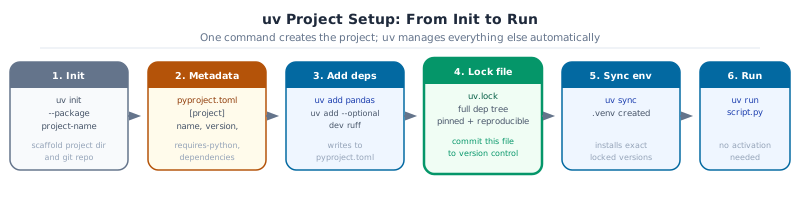
Create the grade-predictor project with the --package flag, which generates the src/ layout:
uv init grade-predictor --package
cd grade-predictor
The generated structure:
grade-predictor/
├── src/
│   └── grade_predictor/
│       └── __init__.py
├── .python-version
├── pyproject.toml
└── README.md
The --package flag matters. Without it, uv init creates a simple script project. With it, you get a proper Python package with the src/ layout: the package lives inside src/ rather than at the project root. That means you can’t accidentally import from the development copy of the code when running scripts from the project root: Python will only find the installed package, which is the version tests and CI will see.
Run uv sync to create the virtual environment and generate uv.lock:
uv syncThe .venv/ directory appears at the project root. You don’t activate it manually: uv run handles that automatically.
Activity 1: initialize and Inspect
Goal: Run uv init grade-predictor –package in a temporary directory, then open pyproject.toml and identify the [project] section. List the three files whose purpose you cannot immediately guess and look each one up.
3. pyproject.toml anatomy
pyproject.toml is the single source of truth for a Python project. It replaces four files that older projects spread across: setup.py, setup.cfg, requirements.txt, and pytest.ini. Every modern Python tool reads it.
Here is a complete pyproject.toml for grade-predictor with annotations:
[project]
name = "grade-predictor"
version = "0.1.0"
description = "Grade computation and risk analysis for university_analytics.csv"
authors = [{ name = "Anthony Faustine", email = "sambaiga@gmail.com" }]
requires-python = ">=3.12"               # minimum Python version; 3.12 adds better error messages
dependencies = [
    "pandas>=2.1",
    "numpy>=1.26",
]

[project.optional-dependencies]          # groups; installed only when requested
modelling = [
    "scikit-learn>=1.7",
    "xgboost>=3.0",
]
test = [
    "pytest>=8.0",
    "pytest-cov>=6.0",
]
dev = [
    "ruff>=0.5",
    "pre-commit>=4.0",
    "python-dotenv>=1.0",
]

[build-system]
requires = ["hatchling"]
build-backend = "hatchling.build"

[tool.hatch.build.targets.wheel]
packages = ["src/grade_predictor"]

[tool.pytest.ini_options]
testpaths = ["tests"]
addopts = "--cov=grade_predictor --cov-report=term-missing --cov-fail-under=80"

[tool.ruff]
target-version = "py312"
line-length = 100
Key Concept: pyproject.toml is the single source of truth
Read it and you can understand any modern Python project in under five minutes: what it does, what it depends on, how to test it, and how to build it. It replaces setup.py, requirements.txt, setup.cfg, and pytest.ini: all of them.
Activity 2: edit pyproject.toml
Goal: Open the pyproject.toml from Activity 1. Change requires-python to >=3.12, add polars>=1.0 to dependencies, and add a dev optional group containing jupyter>=1.0. Then run uv sync and confirm no errors.
4. Adding and syncing dependencies
uv add is the correct way to add a dependency. It updates pyproject.toml, resolves the full dependency graph, and writes a new uv.lock in one step:
uv add pandas numpy
uv add --optional dev ruff pytest
uv sync
Compare this to pip install pandas: pip installs the package into whatever environment is currently active but writes nothing permanent. Next week, on a different machine, there’s no record of which version was installed.
Useful commands:
uv add <package>                      # add to core dependencies
uv add --optional dev <package>       # add to the dev group
uv remove <package>                   # remove from dependencies
uv sync                               # install everything in uv.lock
uv sync --extra test                  # install core + test group
uv sync --all-extras                  # install all groups
uv lock --upgrade-package pandas      # upgrade one package and update lock
After uv sync, confirm the environment works:
uv run python -c "import pandas; print(pandas.__version__)" Pro Tip: Commit uv.lock, not requirements.txt
uv.lock records every transitive dependency. A requirements.txt generated from it records only what you asked for, not what was actually resolved. When you pin with requirements.txt, a colleague installing a week later may get different transitive versions. Commit uv.lock and delete any requirements.txt workflow.
Activity 3: add and Verify a Dependency
Goal: Add polars>=1.0 as a core dependency with uv add. Then add great-tables>=0.20 to the dev group. Run uv sync and confirm both packages import: uv run python -c “import polars, great_tables; print(‘ok’)”.
5. Optional dependency groups for ML projects
Heavy ML dependencies are the single biggest cause of slow CI pipelines. A cold install of PyTorch takes three to four minutes; scikit-learn and pytest take under 20 seconds. Separating them into optional groups means CI only installs what it actually needs.
[project.optional-dependencies]
modelling = [
    "scikit-learn>=1.7",
    "xgboost>=3.0",
    "torch>=2.0",          # ~800MB; only needed for deep learning experiments
]
test = [
    "pytest>=8.0",
    "pytest-cov>=6.0",
]
dev = [
    "ruff>=0.5",
    "pre-commit>=4.0",
    "jupyter>=1.0",
]
Three installation profiles:
| Command | Who uses it | What gets installed |
|---|---|---|
uv sync |
CI (fast path), Docker prod image | Core dependencies only |
uv sync --extra test |
CI (test path) | Core + test group |
uv sync --all-extras |
Local development | Everything |
The GitHub Actions workflow from Ch04 uses uv sync --extra test. Your local environment uses uv sync --all-extras. The production Docker image uses uv sync with no extras.
Pro Tip: Keep torch in an optional group
A CI run that installs PyTorch takes 3 to 4 minutes on a cold cache. One that installs only pandas and pytest takes under 30 seconds. Multiply by 20 pushes per day and that is two hours of CI time saved weekly, for free.
Activity 4: verify Group Isolation
Goal: Add scikit-learn>=1.7 to a modelling group. Run uv sync (no extras) and confirm scikit-learn is NOT importable: uv run python -c “import sklearn” should raise ModuleNotFoundError. Then run uv sync –extra modelling and confirm it imports.
6. Secret management with .env
A database password or API key committed to a public GitHub repository is searchable, permanent (even after git rm), and a real security incident. Don’t put secrets in version-controlled files.
Create .env at the project root:
# .env : never commit this file
DATABASE_URL=postgresql://user:password@localhost/grades
OPENAI_API_KEY=sk-...
REPORT_TITLE=Grade Predictor Report
Add to .gitignore immediately:
echo ".env" >> .gitignore
echo "*.env" >> .gitignore
Load in Python with python-dotenv:
from dotenv import load_dotenv
import os

load_dotenv()                              # reads .env into os.environ
db_url = os.getenv("DATABASE_URL")
report_title = os.getenv("REPORT_TITLE", "Default Title")  # second arg is fallback
Commit an .env.example with placeholder values so collaborators know which variables to set:
# .env.example : commit this file
DATABASE_URL=postgresql://user:password@localhost/grades
OPENAI_API_KEY=sk-your-key-here
REPORT_TITLE=My Report
Common Mistake: Defaults that are real values
os.getenv(“API_KEY”, “sk-prod-abc123”) looks harmless until someone commits that file. The key is in git history permanently at that point: even if you delete the line later. A placeholder default like “your-key-here” is safe; a real credential isn’t. If a key is committed by accident, rotate it immediately.
Activity 5: load a Secret from .env
Goal: Create .env with REPORT_TITLE=“Grade Predictor”. Add python-dotenv to the dev group. Write a script scripts/report.py that loads the title and prints it. Confirm .env is in .gitignore before running git status.
7. uv run: the universal entry point
uv run executes any command inside the project environment without requiring manual activation of .venv:
uv run python scripts/report.py           # run a script
uv run pytest                              # run tests
uv run ruff check .                        # lint
uv run jupyter lab                         # open Jupyter
uv run --with httpx python -c "import httpx; print(httpx.__version__)"  # one-off tool
The --with flag installs a package into the run environment for that command only, without adding it to pyproject.toml. It’s the right way to use tools you reach for occasionally (nbmake, httpx, a formatter you’re evaluating) without polluting the project’s dependency list.
uv run always uses the project environment defined by uv.lock. Shell state: which conda environment is active, whether you ran source .venv/bin/activate in another terminal: never leaks in.
Key Concept: uv run replaces manual venv activation
Forget to run source .venv/bin/activate and you install into the wrong Python. uv run doesn’t have that problem: it always resolves the project environment from uv.lock, regardless of shell state. Use it for every command in a project and activation errors disappear entirely.
Capstone - Build grade-predictor from Scratch
Build the complete initial structure of the grade-predictor project. By the end, you’ll have a runnable Python package with a proper environment.
Capstone: grade-predictor initial setup
-
Run
uv init grade-predictor –packageandcd grade-predictor -
Add core dependencies:
pandas>=2.1,numpy>=1.26 -
Add optional groups:
testwithpytest>=8.0andpytest-cov>=6.0;devwithruff>=0.5andpython-dotenv>=1.0 -
Write
src/grade_predictor/core.pywith this function:
def compute_grade(midterm: float, final: float, project: float) -> float: return midterm * 0.30 + final * 0.45 + project * 0.25 -
Confirm it runs:
uv run python -c “from grade_predictor.core import compute_grade; print(compute_grade(80, 85, 90))” -
Create
.envwithREPORT_TITLE=Grade Predictorand add.envto.gitignore
Next: Chapter 20: Code Quality with ruff: ruff check and ruff format on the codebase you just built.