class StudentRecord:
    """A single student's academic record.

    Args:
        name: Student's full name.
        scores: List of numeric assessment scores (0-100).
        program: Degree program name.
    """

    def __init__(
        self,
        name: str,
        scores: list[float] | None = None,
        program: str = "Undeclared",
    ) -> None:
        self.name = name
        self.scores: list[float] = scores if scores is not None else []
        self.program = program

    def __repr__(self) -> str:
        avg = sum(self.scores) / len(self.scores) if self.scores else 0.0
return f"StudentRecord(name={self.name!r}, program={self.program!r}, avg={avg:.1f})"Chapter 4: Classes and patterns


A student record is not three separate variables; it is one thing. A class lets you treat it that way: one __repr__(), one place where the rules about valid scores live, one factory method that builds it from a raw CSV row.
Chapter 3 built functions: the logic. A function only holds logic; the data it operates on lives somewhere else, as loose variables the function accepts and returns. A class bundles data and the functions that operate on it under one name.
This chapter adds the tools that Chapter 3 could not carry: classes, dataclasses, NamedTuples, TypedDicts, exceptions, and file I/O. Chapter 5 (05-math-statistics.ipynb) uses these patterns throughout as it introduces the standard library math and statistics modules.
1. Classes
A class is a blueprint for creating objects. Each object (instance) bundles its own data (attributes) with the functions (methods) that operate on it. You create the blueprint once with class, then stamp out as many instances as you need.
Three things make a class useful rather than just a namespace: - __init__: sets the initial state of each instance - __repr__: returns a readable string when you print or inspect the object - methods: functions that always have access to the instance’s data via self
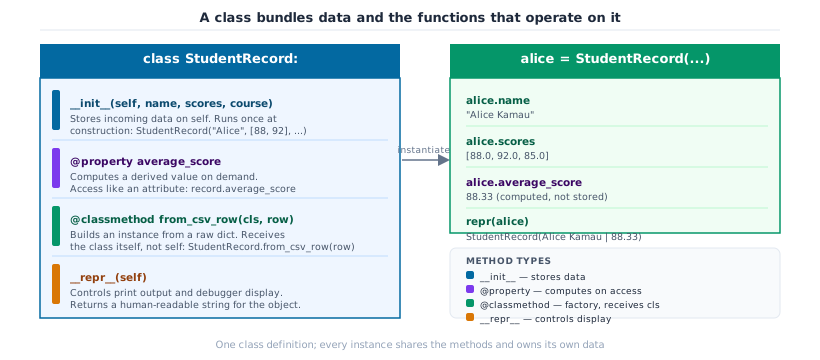
__init__) and the functions that operate on it (@property, @classmethod, __repr__). Each instance owns its own data; all instances share the methods.__init__ and __repr__
Every class needs two methods before it’s useful in interactive work. __init__ runs the moment you create an instance: it receives the raw data and stores it on self. __repr__ is what Python prints when you inspect the object in the REPL or call print() on it.
Without __repr__, Python shows something like <__main__.StudentRecord object at 0x7f3a2c1d4e50>. That address tells you nothing. With a good __repr__ you can see the name, program, and average in one glance, which makes debugging feel like reading, not guessing.
The rule: __repr__ should produce a string that is both human-readable and, where possible, copy-pasteable back into Python to re-create the object.
alice = StudentRecord(
    name="Alice Kamau",
    scores=[88.0, 92.0, 85.0, 90.0],
    program="Computer Science",
)
bob = StudentRecord(
    name="Bob Mwangi",
    scores=[62.0, 70.0, 58.0, 74.0],
    program="Mathematics",
)

print(alice)  # __repr__ in action: no print formatting needed
print(bob)
StudentRecord(name='Alice Kamau', program='Computer Science', avg=88.8)
StudentRecord(name='Bob Mwangi', program='Mathematics', avg=66.0)@property: computed attributes
You could store the average as an attribute set in __init__: self.average = sum(scores) / len(scores). The problem is stale state. If someone appends a score later, student.scores.append(95.0), the stored average is now wrong, and nothing tells you.
A @property computes the value fresh every time you access it. From the caller’s side it looks exactly like reading a plain attribute: student.average, no parentheses. Under the hood Python calls the method. You get the right answer regardless of when scores were added.
Use @property for any value that is derived from other attributes. Store it explicitly only if the computation is genuinely expensive and you have a caching strategy.
class StudentRecord:
    """A single student's academic record with computed grade properties.

    Args:
        name: Student's full name.
        scores: List of numeric assessment scores (0-100).
        program: Degree program name.
    """

    def __init__(
        self,
        name: str,
        scores: list[float] | None = None,
        program: str = "Undeclared",
    ) -> None:
        self.name = name
        self.scores: list[float] = scores if scores is not None else []
        self.program = program

    def __repr__(self) -> str:
        return f"StudentRecord(name={self.name!r}, program={self.program!r}, avg={self.average:.1f})"

    @property
    def average(self) -> float:
        """Mean of all scores; 0.0 if no scores recorded."""
        return sum(self.scores) / len(self.scores) if self.scores else 0.0

    @property
    def letter_grade(self) -> str:
        """Letter grade derived from current average."""
        avg = self.average
        if avg >= 90:
            return "A"
        if avg >= 80:
            return "B"
        if avg >= 70:
            return "C"
        if avg >= 60:
            return "D"
        return "F"
alice = StudentRecord("Alice Kamau", [88.0, 92.0, 85.0], "Computer Science")
print(f"Before: avg={alice.average:.1f} grade={alice.letter_grade}")
# Add a new score: the property recomputes on the fly
alice.scores.append(95.0)
print(f"After : avg={alice.average:.1f} grade={alice.letter_grade}")
print(alice)Before: avg=88.3 grade=B
After : avg=90.0 grade=A
StudentRecord(name='Alice Kamau', program='Computer Science', avg=90.0)@classmethod factory methods
A @classmethod is an alternative constructor: it builds an instance from a different kind of input without requiring the caller to know what __init__ expects.
The pattern is useful whenever your data arrives in a format different from what __init__ expects. A CSV row is a dict[str, str] where every value is a string. Putting the parsing logic inside a @classmethod keeps __init__ clean and makes the intent explicit at the call site: StudentRecord.from_dict(row) reads like documentation.
class StudentRecord:
    """A student record with factory method support.

    Args:
        name: Student's full name.
        scores: List of numeric assessment scores (0-100).
        program: Degree program name.
    """

    def __init__(
        self,
        name: str,
        scores: list[float] | None = None,
        program: str = "Undeclared",
    ) -> None:
        self.name = name
        self.scores: list[float] = scores if scores is not None else []
        self.program = program

    def __repr__(self) -> str:
        return f"StudentRecord(name={self.name!r}, program={self.program!r}, avg={self.average:.1f})"

    @property
    def average(self) -> float:
        """Mean of all scores; 0.0 if no scores recorded."""
        return sum(self.scores) / len(self.scores) if self.scores else 0.0

    @property
    def letter_grade(self) -> str:
        """Letter grade derived from current average."""
        avg = self.average
        if avg >= 90:
            return "A"
        if avg >= 80:
            return "B"
        if avg >= 70:
            return "C"
        if avg >= 60:
            return "D"
        return "F"

    @classmethod
    def from_dict(cls, record: dict[str, object]) -> "StudentRecord":
        """Construct a StudentRecord from a raw CSV row dict.

        Args:
            record: Dict with keys 'name', 'scores' (comma-separated string
                or list of floats), and 'program'.

        Returns:
            A new StudentRecord instance.
        """
        raw_scores = record.get("scores", "")
        if isinstance(raw_scores, str):
            scores = [float(s.strip()) for s in raw_scores.split(",") if s.strip()]
        else:
            scores = list(raw_scores)  # type: ignore[arg-type]
        return cls(
            name=str(record.get("name", "")),
            scores=scores,
            program=str(record.get("program", "Undeclared")),
        )
# Simulated rows as they would arrive from csv.DictReader
raw_rows: list[dict[str, object]] = [
{"name": "Carol Osei", "scores": "91.0, 95.0, 89.0", "program": "Data Science"},
{"name": "Dan Kimani", "scores": "74.0, 68.0, 80.0", "program": "Mathematics"},
]
records = [StudentRecord.from_dict(row) for row in raw_rows]
for r in records:
print(r)StudentRecord(name='Carol Osei', program='Data Science', avg=91.7)
StudentRecord(name='Dan Kimani', program='Mathematics', avg=74.0)Inheritance and abstract base classes
Inheritance is often introduced as a code-reuse tool: put shared logic in a parent class. That is true, but it misses the more important use case in ML engineering: enforcing a contract.
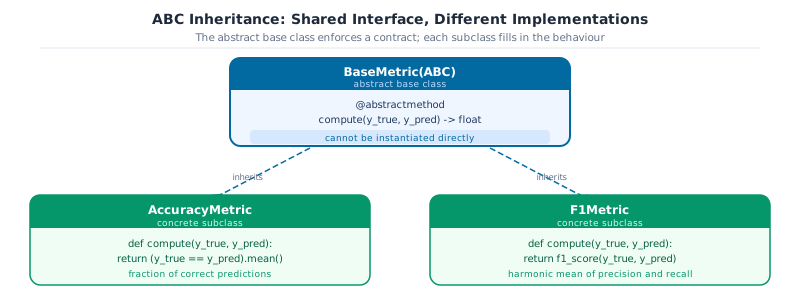
When you define an Abstract Base Class (ABC), you’re saying: any class that claims to be a BaseMetric must implement compute(actual_labels, predicted_labels). Python will refuse to instantiate a subclass that forgets to implement it. This isn’t a convention or a code review comment, it’s a runtime guarantee.
This is how scikit-learn’s BaseEstimator enforces that every estimator has .fit() and .predict(), and how PyTorch’s nn.Module enforces forward(). You will implement the same pattern here for evaluation metrics.
The inheritance chain makes the contract visible. BaseMetric declares what every metric must implement; concrete classes fill in the details. Python refuses to instantiate BaseMetric directly, you can only create AccuracyMetric or F1Metric.
from abc import ABC, abstractmethod


class BaseMetric(ABC):
    """Abstract base class for all evaluation metrics.

    Subclasses must implement `compute`; Python will refuse to instantiate
    any subclass that does not.
    """

    @abstractmethod
    def compute(self, actual_labels: list[int], predicted_labels: list[int]) -> float:
        """Compute the metric value.

        Args:
            actual_labels: Ground-truth labels.
            predicted_labels: Predicted labels.

        Returns:
            Scalar metric value.
        """


class AccuracyMetric(BaseMetric):
    """Fraction of predictions that match the ground truth."""

    def compute(self, actual_labels: list[int], predicted_labels: list[int]) -> float:
        if not actual_labels:
            return 0.0
        correct = sum(t == p for t, p in zip(actual_labels, predicted_labels, strict=False))
        return correct / len(actual_labels)


class F1Metric(BaseMetric):
    """Binary F1 score: harmonic mean of precision and recall."""

    def compute(self, actual_labels: list[int], predicted_labels: list[int]) -> float:
        tp = sum(t == 1 and p == 1 for t, p in zip(actual_labels, predicted_labels, strict=False))
        fp = sum(t == 0 and p == 1 for t, p in zip(actual_labels, predicted_labels, strict=False))
        fn = sum(t == 1 and p == 0 for t, p in zip(actual_labels, predicted_labels, strict=False))
        if tp == 0:
            return 0.0
        precision = tp / (tp + fp)
        recall = tp / (tp + fn)
        return 2 * precision * recall / (precision + recall)
actual_labels = [1, 0, 1, 1, 0, 1, 0, 0]
predicted_labels = [1, 0, 1, 0, 0, 1, 1, 0]
metrics: list[BaseMetric] = [AccuracyMetric(), F1Metric()]
for metric in metrics:
score = metric.compute(actual_labels, predicted_labels)
print(f"{metric.__class__.__name__:<18}: {score:.4f}")
# Demonstrate the ABC contract: Python refuses to instantiate BaseMetric directly
try:
_ = BaseMetric() # type: ignore[abstract]
except TypeError as exc:
print(f"\nABC contract enforced: {exc}")AccuracyMetric : 0.7500
F1Metric : 0.7500
ABC contract enforced: Can't instantiate abstract class BaseMetric without an implementation for abstract method 'compute'
Key Concept: class vs @dataclass: when to use which
Both are classes. The difference is how much Python generates for you.
They can coexist: a
Both are classes. The difference is how much Python generates for you.
| Need | Reach for |
|---|---|
Store fields, get free repr and eq
|
@dataclass
|
Computed properties (@property)
|
class
|
Alternative constructors (@classmethod)
|
class
|
| Enforce an interface (ABC) |
class
|
| Immutable, hashable record |
@dataclass(frozen=True)
|
They can coexist: a
@dataclass can have @property methods and @classmethod factories. Start with @dataclass when you only need structured storage; graduate to a plain class when you need the full toolkit shown in this section.
Activity 1: CourseRecord class
Define a CourseRecord class (not a dataclass) that stores code: str, semester: str, instructor: str, and students: list[str]. Add a @property enrolment that returns the student count, a repr that prints CourseRecord(CS101 / 2024-S1), and a @classmethod from_dict(cls, row) that builds a record from a raw dict. Instantiate two records and print their enrolment counts.
# TODO: define CourseRecord
...

# Quick test
row = {
    "code": "CS101",
    "semester": "2024-S1",
    "instructor": "Dr. Mwangi",
    "students": ["Alice", "Bob", "Carol", "Dan"],
}
# cr = CourseRecord.from_dict(row)
# print(cr)             # CourseRecord(CS101 / 2024-S1)
# print(cr.enrolment)   # 4
2. Dataclasses
Writing __init__ by hand for every class is repetitive when the class is just a container for data. The @dataclass decorator generates __init__, __repr__, and __eq__ automatically from the field annotations.
Key Concept: @dataclass vs a plain class
Use @dataclass when the class is primarily a data container: a fixed set of typed fields with no complex initialisation logic. Use a plain class when you need a non-trivial init, inheritance, or methods that go well beyond reading and writing fields.
Rule of thumb: if the init would be nothing but self.x = x assignments, reach for @dataclass.
A CourseConfig holds the settings for one course. Without @dataclass you would write twelve lines of boilerplate. With it, you write the fields:
from dataclasses import dataclass, field


@dataclass
class CourseConfig:
    """Configuration for a single course."""

    code: str
    semester: str
    pass_mark: float = 50.0
    max_attempts: int = 2
    tags: list[str] = field(default_factory=list)
@dataclass generates __init__, __repr__, and __eq__. Fields with field(default_factory=list) get a fresh list per instance, which is the fix for the mutable default problem from Chapter 3:
cfg = CourseConfig(code="CS101", semester="2024-S1", pass_mark=55.0)
cfg.tags.append("core")
cfg.tags.append("required")

print(cfg)
print(f"pass mark : {cfg.pass_mark}")
print(f"tags      : {cfg.tags}")
CourseConfig(code='CS101', semester='2024-S1', pass_mark=55.0, max_attempts=2, tags=['core', 'required'])
pass mark : 55.0
tags : ['core', 'required']frozen=True: immutable and hashable
frozen=True prevents field mutation after creation. A frozen dataclass is hashable, so it can be used as a dict key or put in a set:
from dataclasses import dataclass


@dataclass(frozen=True)
class GradeScale:
    """Immutable grade boundary configuration."""

    pass_mark: float = 50.0
    distinction_mark: float = 75.0
    max_score: float = 100.0

    def __post_init__(self) -> None:
        if not (0 <= self.pass_mark < self.distinction_mark <= self.max_score):
            raise ValueError(f"Invalid grade boundaries: {self.pass_mark} / {self.distinction_mark} / {self.max_score}")
__post_init__ runs automatically after __init__ and is the right place for cross-field validation:
standard = GradeScale(pass_mark=50.0, distinction_mark=75.0)
strict = GradeScale(pass_mark=60.0, distinction_mark=80.0)

# Frozen dataclasses are hashable: use as dict keys
cohort_results: dict[GradeScale, list[str]] = {
    standard: ["Alice", "Carol"],
    strict: ["Dan"],
}

print(standard)
print(f"Standard scale cohort: {cohort_results[standard]}")
GradeScale(pass_mark=50.0, distinction_mark=75.0, max_score=100.0)
Standard scale cohort: ['Alice', 'Carol'] Activity 2: ExamResult dataclass
Define a frozen ExamResult dataclass with fields: student_id: str, course: str, score: float, semester: str. Add a post_init that raises ValueError if score is outside 0-100. Instantiate a valid result and one that should fail, catching the error.
from dataclasses import dataclass


@dataclass(frozen=True)
class ExamResult:
    """Immutable record of one exam attempt."""

    student_id: str
    course: str
    score: float
    semester: str

    def __post_init__(self) -> None: ...  # TODO: validate score in range 0-100


# Tests
r = ExamResult("S1042", "CS101", 88.5, "2024-S1")
print(r)
try:
    ExamResult("S1043", "CS101", 105.0, "2024-S1")  # should raise
except ValueError as e:
    print(f"Caught: {e}")
ExamResult(student_id='S1042', course='CS101', score=88.5, semester='2024-S1')3. NamedTuple
A NamedTuple is a tuple whose fields have names. It gives you a lightweight, immutable record: you access fields by name instead of by index, which makes the code self-documenting.
Key Concept: NamedTuple vs dataclass
- Use NamedTuple when the record is read-only and you want tuple semantics: unpacking, indexing, and value-based comparison.
-
Use @dataclass when you need mutability, a
post_init, or methods beyond reading fields.
Define a NamedTuple using the class syntax. Fields get names and type annotations:
from typing import NamedTuple


class StudentGrade(NamedTuple):
    """Immutable record of one assessed outcome."""

    student_id: str
    course: str
    score: float
    grade: str
NamedTuples support both attribute access and positional unpacking. They also compare equal when all fields match:
g = StudentGrade(student_id="S1042", course="CS101", score=88.5, grade="B")

print(g)
print(f"score : {g.score}")

# Unpack like a plain tuple
sid, course, score, grade = g
print(f"{sid} scored {score} in {course}")

# Equal if all fields match
same = StudentGrade("S1042", "CS101", 88.5, "B")
print(f"Equal: {g == same}")
StudentGrade(student_id='S1042', course='CS101', score=88.5, grade='B')
score : 88.5
S1042 scored 88.5 in CS101
Equal: Truegrades: list[StudentGrade] = [
StudentGrade("S1042", "CS101", 88.5, "B"),
StudentGrade("S1043", "CS101", 91.0, "A"),
StudentGrade("S1044", "CS101", 74.0, "C"),
StudentGrade("S1045", "CS101", 55.5, "D"),
]
# Sort by score descending
top = sorted(grades, key=lambda g: g.score, reverse=True)
for g in top:
print(f" {g.student_id} {g.score:5.1f} {g.grade}") S1043 91.0 A
S1042 88.5 B
S1044 74.0 C
S1045 55.5 D4. TypedDict and type aliases
Raw dicts arrive from JSON files, CSV rows, and API responses. A TypedDict defines a typed schema for a dict: it tells your type checker which keys to expect and what type each value should be, without changing runtime behaviour at all.
Key Concept: TypedDict
A TypedDict is purely a type-checker hint. At runtime, a TypedDict is still an ordinary dict: no init, no field validation, no overhead. Use it when you receive raw dicts from external sources and want your editor to catch missing or misspelled keys before the code runs.
Define a schema for the raw student rows that arrive from a CSV or API:
from typing import TypedDict


class StudentRow(TypedDict):
    """Schema for a single row from the student CSV."""

    student_id: str
    name: str
    gpa: float
    major: str
The TypedDict annotates the variable. The dict itself is still a plain dict at runtime:
row: StudentRow = {
    "student_id": "S1042",
    "name": "Alice",
    "gpa": 3.95,
    "major": "CS",
}

print(row["name"])
print(type(row))  # still a plain dict at runtime
Alice
<class 'dict'>Type aliases
A type alias gives a long type expression a short, meaningful name. Use type (Python 3.12+) for new code:
type ScoreList = list[float]
type CohortData = dict[str, ScoreList]

cohort: CohortData = {
    "CS101": [88.0, 91.0, 74.0, 55.5],
    "MATH201": [72.0, 84.0, 67.0, 90.0],
}

for course, scores in cohort.items():
    mean = sum(scores) / len(scores)
    print(f"{course}: mean={mean:.1f}")
CS101: mean=77.1
MATH201: mean=78.25. Exception handling
An exception is an error that occurs while your program is running. By default, Python stops immediately and prints a traceback. Exception handling lets you catch the error, respond to it gracefully, and keep the program running.
# Without handling - program crashes:
int("abc")   # ValueError: invalid literal for int() with base 10: 'abc'

# With handling - program continues:
try:
    int("abc")
except ValueError:
    print("That was not a number, skipping")
In data pipelines and ML training loops, unhandled exceptions can discard hours of computation. Always handle errors at system boundaries (user input, file I/O, APIs).
Key Concept: try / except / else / finally
-
try: code that might raise an exception -
except ExcType as e: handle a specific exception -
else: runs only if NO exception was raised intry -
finally: always runs, even if an exception propagates (use for cleanup)
Catch the most specific exception you can. Bare except: or except Exception: hides bugs and silences keyboard interrupts.
def parse_score(raw: str) -> float:
    """Parse a score string and validate it is in [0, 100].

    Args:
        raw: String representation of a numeric score.

    Returns:
        Validated float score.

    Raises:
        ValueError: If raw is not numeric or out of range.
    """
    try:
        value = float(raw)
    except ValueError:
        raise ValueError(f"{raw!r} is not a valid number") from None

    if not 0 <= value <= 100:
        raise ValueError(f"Score {value} is out of range [0, 100]")

    return value
Test parse_score() against a range of inputs: valid numbers, out-of-range values, and non-numeric strings. The else clause runs only on the success path:
# Test parse_score against valid and invalid inputs
test_inputs: list[str] = ["87.5", "105", "abc", "-3", "72"]

for raw in test_inputs:
    try:
        score = parse_score(raw)
    except ValueError as exc:
        print(f"  {raw!r:<8} -> ERROR: {exc}")
    else:
        print(f"  {raw!r:<8} -> OK: {score}")
'87.5' -> OK: 87.5
'105' -> ERROR: Score 105.0 is out of range [0, 100]
'abc' -> ERROR: 'abc' is not a valid number
'-3' -> ERROR: Score -3.0 is out of range [0, 100]
'72' -> OK: 72.0finally runs regardless of whether an exception occurred or was handled. Use it for cleanup code (closing files, releasing connections) that must execute either way. This example illustrates the pattern using explicit open/close; in practice, always use with open(...) as fh instead (shown in Sec. 7):
# else runs ONLY when try succeeds; finally ALWAYS runs (cleanup guarantee)
def load_scores(filepath: str) -> list[float]:
    """Load numeric scores from a text file, one per line."""
    fh = None
    try:
        fh = open(filepath, encoding="utf-8")  # noqa: SIM115, PTH123
        lines = fh.readlines()
    except FileNotFoundError:
        print(f"File not found: {filepath!r}")
        return []
    except PermissionError as exc:
        print(f"Permission denied: {exc}")
        return []
    else:
        print(f"Loaded {len(lines)} lines successfully")
        return [float(line.strip()) for line in lines if line.strip()]
    finally:
        if fh is not None:
            fh.close()
            print("File handle closed")
finally guarantees the file handle is closed even when the file doesn’t exist: no resource leak is possible:
# NOTE: prefer `with open(...) as fh` in practice (shown in Sec. 7).
# This example uses explicit open/close to make else/finally visible.
result = load_scores("nonexistent.txt")
print(f"Result: {result}")
File not found: 'nonexistent.txt'
Result: []Custom exception classes
Subclass a built-in exception to give callers a specific type to catch. Store the structured context as instance attributes for programmatic access:
# Custom exception classes give callers something specific to catch
class DataValidationError(ValueError):
    """Raised when a data record fails validation."""

    def __init__(self, field: str, value: object, reason: str) -> None:
        self.field = field
        self.value = value
        self.reason = reason
        super().__init__(f"Validation failed for {field!r}={value!r}: {reason}")
Define a validator that raises DataValidationError with field-level context, then test it. The except DataValidationError clause catches only your custom type, not any accidental ValueError from elsewhere in the code:
def validate_student(record: dict[str, object]) -> None:
    """Validate a student record dict against required field constraints."""
    gpa = record.get("gpa")
    if not isinstance(gpa, int | float):
        raise DataValidationError("gpa", gpa, "must be numeric")
    if not 0.0 <= float(gpa) <= 4.0:
        raise DataValidationError("gpa", gpa, "must be in [0.0, 4.0]")

    name = record.get("name", "")
    if not isinstance(name, str) or not name.strip():
        raise DataValidationError("name", name, "must be a non-empty string")
Test against valid and invalid records. The custom exception prints exactly which field failed and why:
test_records: list[dict[str, object]] = [
    {"name": "Alice", "gpa": 3.95},  # valid
    {"name": "Bob", "gpa": 5.0},  # GPA out of range
    {"name": "", "gpa": 3.5},  # empty name
]

for rec in test_records:
    try:
        validate_student(rec)
        print(f"  {rec['name']!r:<10} -> valid")
    except DataValidationError as exc:
        print(f"  {rec.get('name')!r:<10} -> {exc}")
'Alice' -> valid
'Bob' -> Validation failed for 'gpa'=5.0: must be in [0.0, 4.0]
'' -> Validation failed for 'name'='': must be a non-empty string
Activity 4: safe batch parser
Write
Write
parse_batch(rows) that returns (valid, errors): a list of successfully parsed floats and a list of error messages.
rows = ['85.0', '92', 'n/a', '-5', '78.5', '110', '63']

valid, errors = parse_batch(rows)
# valid  = [85.0, 92.0, 78.5, 63.0]
# errors = ["'n/a' isn't a valid number",
#           "'-5' out of range [0, 100]",
#           "'110' out of range [0, 100]"]
def parse_batch(rows: list[str]) -> tuple[list[float], list[str]]:
    """Parse a batch of score strings, separating valid from invalid.

    Args:
        rows: List of raw score strings.

    Returns:
        Tuple of (valid_scores, error_messages).
    """
    valid: list[float] = []
    errors: list[str] = []
    # TODO: iterate rows, use parse_score from above, collect results
    return valid, errors


rows: list[str] = ["85.0", "92", "n/a", "-5", "78.5", "110", "63"]
valid, errors = parse_batch(rows)
print(f"valid  = {valid}")
print(f"errors = {errors}")
valid = []
errors = []6. File I/O with pathlib
File I/O (Input/Output) means reading data from files on disk and writing results back. Almost every data science workflow starts by loading a CSV, JSON, or Parquet file and ends by saving results somewhere.
pathlib.Path is the modern Python way to work with file paths. It is cross-platform (works on Windows, macOS, and Linux without changes) and composable:
from pathlib import Path

data_dir  = Path('tutorials') / 'data'        # / joins path parts
csv_file  = data_dir / 'students.csv'
print(csv_file)   # tutorials/data/students.csv
Key Concept: pathlib.Path, the modern way to handle paths
Since Python 3.4, pathlib.Path is the standard for file-system work. It is cross-platform, composable with /, and carries methods for existence checks, directory creation, and reading/writing, all in one object.
Always use with open(…) as fh (context manager) so the file is closed automatically, even if an exception occurs.
Common Mistake: Bare string paths
open(‘data/file.csv’) works but gives you no path-manipulation methods and is fragile on Windows vs. macOS/Linux. Use Path(‘data’) / ‘file.csv’ instead.
from pathlib import Path

# Path composition: / operator joins parts, cross-platform
project_root: Path = Path()
data_dir: Path = project_root / "data"
output_file: Path = data_dir / "results" / "run_001.json"

print(f"data_dir    : {data_dir}")
print(f"output_file : {output_file}")
data_dir : data
output_file : data/results/run_001.jsonEvery Path object knows its own parts: no string slicing to extract a filename or extension. mkdir(exist_ok=True) is the safest way to create a directory (no error if it already exists):
# Path properties: inspect parts of a path without string slicing
p = Path("tutorials/03-data-analysis/data/primary.csv")
print(f"p.name   : {p.name}")  # 'primary.csv'
print(f"p.stem   : {p.stem}")  # 'primary'
print(f"p.suffix : {p.suffix}")  # '.csv'
print(f"p.parent : {p.parent}")  # 'tutorials/03-data-analysis/data'
print(f"p.parts  : {p.parts}")

# Safe directory creation: no error if it already exists
tmp_dir = Path("tmp_activity")
tmp_dir.mkdir(exist_ok=True)
print(f"\ntmp_dir exists: {tmp_dir.exists()}")
p.name : primary.csv
p.stem : primary
p.suffix : .csv
p.parent : tutorials/03-data-analysis/data
p.parts : ('tutorials', '03-data-analysis', 'data', 'primary.csv')
tmp_dir exists: TrueReading and writing files
Always use the with statement. It closes the file automatically, even if an exception occurs. DictWriter writes rows as dicts keyed by column name:
import csv
from pathlib import Path

tmp = Path("tmp_activity")
tmp.mkdir(exist_ok=True)

csv_path = tmp / "students.csv"
rows: list[dict[str, object]] = [
    {"name": "Alice Kamau", "gpa": 3.95, "major": "CS"},
    {"name": "Bob Mwangi", "gpa": 3.45, "major": "Math"},
    {"name": "Carol Osei", "gpa": 3.88, "major": "CS"},
]

with csv_path.open("w", newline="", encoding="utf-8") as fh:
    writer = csv.DictWriter(fh, fieldnames=["name", "gpa", "major"])
    writer.writeheader()
    writer.writerows(rows)

print(f"Wrote: {csv_path}")
Wrote: tmp_activity/students.csvDictReader reads each row back as a dict keyed by header names, with no positional index access needed:
import csv
from pathlib import Path

csv_path = Path("tmp_activity") / "students.csv"

with csv_path.open(encoding="utf-8") as fh:
    reader = csv.DictReader(fh)
    loaded: list[dict[str, str]] = list(reader)

for row in loaded:
    print(f"  {row['name']:<15} GPA={row['gpa']}  {row['major']}")
Alice Kamau GPA=3.95 CS
Bob Mwangi GPA=3.45 Math
Carol Osei GPA=3.88 CSFor single-document JSON files, Path.write_text() + json.dumps() and Path.read_text() + json.loads() is the most concise round-trip:
import json
from pathlib import Path

tmp = Path("tmp_activity")
json_path = tmp / "run_result.json"
run_data = {"run_id": "exp-001", "accuracy": 0.923, "tags": ["baseline"]}

# Write: write_text is the cleanest one-liner for JSON
json_path.write_text(json.dumps(run_data, indent=2), encoding="utf-8")
print(f"Wrote: {json_path}")

# Read: read_text + json.loads
reloaded: dict[str, object] = json.loads(json_path.read_text(encoding="utf-8"))
print(f"Read back: {reloaded}")
Wrote: tmp_activity/run_result.json
Read back: {'run_id': 'exp-001', 'accuracy': 0.923, 'tags': ['baseline']}
Activity 2: experiment log
Write a function
Hint: Use
Write a function
save_experiment(result: dict, log_dir: Path) -> Path that saves a result dict as a timestamped JSON file (run_20240101_120000.json) inside log_dir, creating the directory if it doesn’t exist. Return the path to the written file. Then read it back and verify the round-trip.Hint: Use
datetime.now(tz=UTC).strftime(‘%Y%m%d_%H%M%S’) for the timestamp and Path.mkdir(parents=True, exist_ok=True) for the directory.
from pathlib import Path

# TODO: implement save_experiment
...EllipsisFinding files
Path.iterdir() yields the immediate children of a directory. Path.rglob(pattern) searches the entire subtree recursively:
tmp = Path("tmp_activity")
print("Files in tmp_activity:")
for f in sorted(tmp.iterdir()):
    size = f.stat().st_size
    print(f"  {f.name:<30} {size:>6} bytes")
Files in tmp_activity:
run_result.json 78 bytes
students.csv 79 bytesrglob('*.ipynb') finds all matching files at any depth. After exploring, clean up the temporary directory with shutil.rmtree():
import shutil

# rglob: recursive search by pattern
notebooks = list(Path("tutorials").rglob("*.ipynb"))
print(f"Notebooks found: {len(notebooks)}")
for nb in sorted(notebooks)[:5]:
    print(f"  {nb}")

# Clean up tmp directory
tmp = Path("tmp_activity")
shutil.rmtree(tmp)
print(f"\nCleaned up: {tmp} exists = {tmp.exists()}")
Notebooks found: 0
Cleaned up: tmp_activity exists = FalseCreating and checking directories
Path.mkdir() creates directories; Path.exists() and Path.is_dir() check state without raising an error. Always prefer mkdir(parents=True, exist_ok=True) over conditionally calling os.makedirs():
results_dir = Path("results") / "experiment_001"
print(f"Exists before : {results_dir.exists()}")

# parents=True creates any missing parent directories
# exist_ok=True is silent if the directory already exists
results_dir.mkdir(parents=True, exist_ok=True)
print(f"Exists after  : {results_dir.exists()}")
print(f"Is directory  : {results_dir.is_dir()}")

# Write a file into the new directory
log_file = results_dir / "metrics.txt"
log_file.write_text("accuracy=0.923\nval_loss=0.218\n")
print(f"Log file size : {log_file.stat().st_size} bytes")

# Clean up
log_file.unlink()
results_dir.rmdir()
results_dir.parent.rmdir()
print("Cleaned up")
Exists before : False
Exists after : True
Is directory : True
Log file size : 30 bytes
Cleaned up
Activity 5: experiment logger
Write a function that appends an experiment result as a JSON line to a log file, then reads and prints all logged runs.
Write a function that appends an experiment result as a JSON line to a log file, then reads and prints all logged runs.
log_experiment(Path('runs.jsonl'), run_id='run-001', accuracy=0.901, loss=0.312)
log_experiment(Path('runs.jsonl'), run_id='run-002', accuracy=0.923, loss=0.218)

# runs.jsonl contents:
# {"run_id": "run-001", "accuracy": 0.901, "loss": 0.312}
# {"run_id": "run-002", "accuracy": 0.923, "loss": 0.218}
Hint: JSONL (JSON Lines), one JSON object per line, is the standard format for streaming experiment logs. Use mode=‘a’ to append.
import json
from pathlib import Path


def log_experiment(log_path: Path, **metrics: object) -> None:
    """Append an experiment result as a JSON line to log_path.

    Args:
        log_path: Path to the .jsonl log file (created if absent).
        **metrics: Any metric name/value pairs to record.
    """
    ...  # TODO


log_path = Path("runs.jsonl")
if log_path.exists():
    log_path.unlink()  # start fresh for this activity

log_experiment(log_path, run_id="run-001", accuracy=0.901, loss=0.312)
log_experiment(log_path, run_id="run-002", accuracy=0.923, loss=0.218)

# Read back and print all runs
if log_path.exists():
    print("Logged runs:")
    for line in log_path.read_text(encoding="utf-8").splitlines():
        run = json.loads(line)
        print(f"  {run}")
    log_path.unlink()
else:
    print("(implement log_experiment above to see output)")
(implement log_experiment above to see output)7. Python gotchas
You have seen these bugs. A function returns something different on the second call than on the first, even though you passed the same arguments. A list you never touched has changed. Division gives the wrong answer in exactly the edge case your test missed.
These are not random bugs: they follow five reproducible patterns. Every experienced Python developer has been bitten by each one. This section names them so you can recognise them on sight.
Key Concept: Python’s most dangerous bugs don’t crash, they silently give wrong answers
Three gotchas account for most silent data bugs in Python:
1. Mutable default arguments: def f(x=[]):, the list is created once and shared across all calls. Use None as the sentinel instead.
2. is vs ==: is tests object identity (same object in memory); == tests value equality. Use == for values, is only for None.
3. Late-binding closures: a lambda inside a loop captures the variable, not its value at that moment. The loop ends, the variable has its final value, and every lambda returns the same thing.
Common Mistake: late binding in closures
When a closure captures a loop variable, it captures the variable by reference, not by value. By the time the closure runs, the loop has finished and the variable holds its final value.
Fix: use a default argument to bind the current value at definition time: lambda i=i: …
# Late binding: i is looked up when called, not when defined
closures_bad = [lambda: i for i in range(4)]  # noqa: B023
print([f() for f in closures_bad])  # [3, 3, 3, 3] not [0, 1, 2, 3]

# Fix: bind i at definition time via a default argument
closures_ok = [lambda i=i: i for i in range(4)]
print([f() for f in closures_ok])  # [0, 1, 2, 3]
[3, 3, 3, 3]
[0, 1, 2, 3] Common Mistake: class-level vs instance-level mutable attributes
A mutable attribute defined at class level (outside init) is shared across all instances. Appending to it from one instance affects every other.
Fix: always initialise mutable attributes inside init, or use field(default_factory=list) in a dataclass.
class Cohort:
    students: list[str] = []  # shared across ALL instances


c1 = Cohort()
c2 = Cohort()
c1.students.append("Alice")
print(c2.students)  # ['Alice'], c2 was not touched


# Fix: initialise inside __init__
class CohortFixed:
    def __init__(self) -> None:
        self.students: list[str] = []  # fresh list per instance


c3 = CohortFixed()
c4 = CohortFixed()
c3.students.append("Alice")
print(c4.students)  # []
['Alice']
[]# GOTCHA 1: Mutable default argument
# The default [] is created ONCE at function definition time - shared across all calls!
def append_score_bad(score: float, history: list[float] = []) -> list[float]: # noqa: B006
history.append(score)
return history
print("Bad default: the list leaks between calls:")
print(append_score_bad(82.0)) # [82.0] expected
print(append_score_bad(91.0)) # [82.0, 91.0] WRONG: previous call leaked in!Bad default: the list leaks between calls:
[82.0]
[82.0, 91.0]The fix: use None as the default sentinel and create a fresh list inside the function body on each call:
def append_score(score: float, history: list[float] | None = None) -> list[float]:
    if history is None:
        history = []  # new list created on every call where history is not provided
    history.append(score)
    return history


print("Fixed: independent list each time:")
print(append_score(82.0))  # [82.0]
print(append_score(91.0))  # [91.0]   fresh list

# Rule: never use a mutable object (list, dict, set) as a default argument value.
# With @dataclass use field(default_factory=list) instead (shown in Sec. 4).
Fixed: independent list each time:
[82.0]
[91.0]Gotcha 2: assignment isn’t a copy. b = a creates a second name for the same list. Shallow .copy() creates a new outer container but inner objects are still shared. Use copy.deepcopy() for fully independent nested structures:
# GOTCHA 2: Assignment is NOT a copy
# For nested structures, .copy() is a SHALLOW copy: inner objects are still shared.

import copy

original: list[list[int]] = [[1, 2], [3, 4]]

ref = original  # same object
shallow_copy = original.copy()  # new outer list, shared inner lists
deep_copy = copy.deepcopy(original)  # completely independent

original[0].append(99)
print(f"original     : {original}")  # [[1, 2, 99], [3, 4]]
print(f"ref          : {ref}")  # [[1, 2, 99], [3, 4]] : same object
print(f"shallow_copy : {shallow_copy}")  # [[1, 2, 99], [3, 4]] : inner list shared!
print(f"deep_copy    : {deep_copy}")  # [[1, 2], [3, 4]]     : fully independent
original : [[1, 2, 99], [3, 4]]
ref : [[1, 2, 99], [3, 4]]
shallow_copy : [[1, 2, 99], [3, 4]]
deep_copy : [[1, 2], [3, 4]]Capstone exercise
This exercise ties together Classes (Sec. 1), Exception Handling (Sec. 2), and File I/O (Sec. 3).
Capstone exercise: student registry
Build a
Build a
StudentRegistry class that:-
Stores a list of
StudentRecordobjects (from Sec. 1). -
Has a method
add(record: StudentRecord) -> None. -
Has a method
top_n(n: int = 3) -> list[StudentRecord]that returns the topnstudents by average. -
Has a
@classmethod from_csv(cls, path: Path) -> ‘StudentRegistry’that reads a CSV file and populates the registry usingStudentRecord.from_dict(), raising aDataLoadError(custom exception) if the file doesn’t exist. -
Has a method
save_report(path: Path) -> Nonethat writes a JSON summary of all students to disk.
from pathlib import Path

# TODO: define DataLoadError and StudentRegistry
...

# registry = StudentRegistry.from_csv(Path('data/students.csv'))
# print(registry.top_n(3))
# registry.save_report(Path('data/report.json'))EllipsisFurther reading
| Resource | Why it matters |
|---|---|
| Python Data Model | Complete reference for __repr__, __eq__, and all dunder methods |
| ABC module docs | abstractmethod, ABCMeta, and @abstractproperty |
| Gamma, E. et al. (1994). Design Patterns. | Factory Method and Template Method patterns underpinning classmethod factories and ABCs |
| Python exceptions hierarchy | Full exception tree; shows which exceptions to catch and at what level |
| pathlib docs | Complete reference for Path; covers glob, walk, chmod, and more |
Summary
| Concept | Key rule |
|---|---|
__init__ |
Receives raw data and stores it on self; never compute derived values here |
__repr__ |
Return a human-readable, ideally re-creatable string; it’s your first debugging tool |
@property |
Compute derived values fresh each access; avoids stale state |
@classmethod |
Alternative constructor for different input formats; keeps __init__ clean |
| ABC | Enforce a contract at instantiation time, not at code review time |
| Exceptions | except SpecificError not bare except; else for success path; finally for cleanup |
pathlib.Path |
Cross-platform paths; compose with /; read with .read_text(), write with .write_text() |
| Context manager | with open(...) as fh always; file closes automatically |
| Gotchas | Mutable defaults, = is not copy, late binding, class-level mutable attributes |
Next: 05-math-statistics.ipynb, arrays, broadcasting, and vectorised operations.