Chapter 20: Code quality with Ruff

A DS pipeline fails silently. No exception, no wrong output, just a subtly different result that nobody catches for two weeks. The cause: a variable shadowing another with the same name, using the wrong scope. Python allows it. No formatter would have flagged it. A linter would have caught it on the first scan.
Code quality tools are not about neatness. They exist because Python’s dynamic typing allows a remarkable range of things that produce wrong results without raising an exception: unused imports that shadow a dependency, variables assigned but never used, functions that return None implicitly when callers expect a value. A linter finds these patterns before they reach production.
You could run three separate tools: Black for formatting, Flake8 for linting, isort for import order. Each has its own config, its own update schedule, and its own conflicts with the others. Ruff replaces all three in a single binary that runs in milliseconds: fast enough to run on every save, on every commit, and in CI without slowing anything down.
The grade-predictor codebase from Chapter 19 is what you’ll run Ruff on here. Chapter 24 automates it on every commit.
Next: Chapter 21: Type annotations builds on clean code by encoding what each function is allowed to receive.
1. Two different jobs
Ruff does two separate things, and it’s worth being clear about which one you’re running.
A formatter rewrites the layout of your code: indentation, line length, quote style, trailing commas. It makes no judgements about correctness. It doesn’t care whether a variable is used or a loop is redundant. It just makes the code look consistent.
A linter reads the code and flags patterns that are wrong, suspicious, or likely to cause bugs. It can’t fix most of what it finds, because fixing requires understanding intent. It tells you “this import is never used” and lets you decide whether to remove it or rename it.
Ruff handles both. They’re separate commands with separate jobs: ruff format for layout, ruff check for correctness. Running format first is the usual order: get the code looking clean, then read what the linter flags.
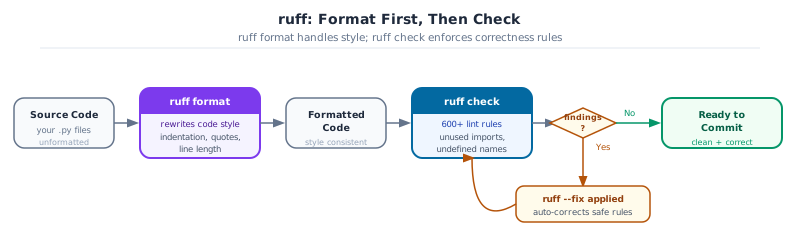
Key Concept: Formatting is about style. Linting is about correctness.
df.drop(“column”) without inplace=True silently does nothing. A formatter won’t catch that: a linter will. Use both: format automatically on every save, run the linter before every commit.
2. Running ruff check
Start with a deliberately messy core.py that contains several common issues:
# src/grade_predictor/core.py  (intentionally broken version for this section)
import os
import sys
from pathlib import Path

def compute_grade(midterm, final, project, weights=[0.30, 0.45, 0.25]):
    total = midterm * weights[0] + final * weights[1] + project * weights[2]
    unused_var = "this is never read"
    return total

def flag_at_risk(df, threshold=50.0):
    try:
        result = df["average_marks"] < threshold
    except:
        result = None
    return result
Run ruff check on it:
uv run ruff check src/The output looks like:
src/grade_predictor/core.py:1:8: F401 [*] `os` imported but unused
src/grade_predictor/core.py:2:8: F401 [*] `sys` imported but unused
src/grade_predictor/core.py:3:8: F401 [*] `pathlib.Path` imported but unused
src/grade_predictor/core.py:5:28: B006 Do not use mutable data structures for argument defaults
src/grade_predictor/core.py:8:5: F841 [*] Local variable `unused_var` is assigned to but never used
src/grade_predictor/core.py:13:5: E722 Do not use bare `except`
Found 6 errors.
[*] 4 fixable with the `--fix` option.
Each line is file:line:col: CODE message. The [*] marker means ruff can auto-fix this one. F401 is the pyflakes family; B006 is from bugbear; E722 is from pycodestyle.
Auto-fix what can be fixed automatically, then inspect the rest:
uv run ruff check src/ --fix
uv run ruff check src/
B006 (mutable default argument) and E722 (bare except) need manual fixes:
def compute_grade(
    midterm: float,
    final: float,
    project: float,
    weights: tuple[float, float, float] = (0.30, 0.45, 0.25),  # tuple, not list
) -> float:
    return midterm * weights[0] + final * weights[1] + project * weights[2]

def flag_at_risk(df, threshold: float = 50.0):
    try:
        return df["average_marks"] < threshold
    except KeyError:                 # specific exception, not bare except
return NoneGoal: Add an unused import, a bare
except:, and a variable assigned but never used to your core.py. Run ruff check src/ and read every line of output. Fix each one manually (do not use –fix for this exercise). Confirm ruff check src/ returns zero findings.
uv run ruff check src/
# Fix each finding, then re-run
uv run ruff check src/
3. Running ruff format
ruff format rewrites the layout of every Python file it touches. It’s opinionated and non-configurable by design: line length is the only setting. The result is that two developers with different editor preferences produce identical diffs.
uv run ruff format src/              # format in place
uv run ruff format src/ --check      # exit 1 if anything would change (CI mode)
uv run ruff format src/ --diff       # show what would change without writing it
The --check flag is what CI uses. If any file needs reformatting, the check fails and the push is blocked. Run ruff format . locally, stage the changes, and push again.
Before format:
def compute_grade(midterm,final,project,weights=(0.30,0.45,0.25)):
    return midterm*weights[0]+final*weights[1]+project*weights[2]
After format:
def compute_grade(
    midterm,
    final,
    project,
    weights=(0.30, 0.45, 0.25),
):
    return midterm * weights[0] + final * weights[1] + project * weights[2]
Pro Tip: Set your editor to run ruff format on save
In VS Code, add “editor.formatOnSave”: true and “[python]”: {“editor.defaultFormatter”: “charliermarsh.ruff”} to settings.json. After that, every save produces a correctly formatted file. CI’s ruff format –check becomes a safety net for the rare case where it did not run, not a first-pass fix.
4. Configuring ruff in pyproject.toml
Without configuration, ruff checks only the E and F rules (pycodestyle and pyflakes). For DS work, several more rule groups are worth adding:
[tool.ruff]
target-version = "py312"
line-length = 100

[tool.ruff.lint]
select = [
    "E",   # pycodestyle errors
    "F",   # pyflakes (unused imports, undefined names)
    "I",   # isort (import order)
    "B",   # bugbear (real bugs, not just style)
    "N",   # pep8 naming
    "UP",  # pyupgrade (modernize syntax automatically)
    "SIM", # simplify (cleaner expressions)
]
ignore = [
    "E402",  # module-level import not at top: notebooks need this
]

[tool.ruff.lint.per-file-ignores]
"tests/**" = ["S101"]          # assert is expected in tests
"**/*.ipynb" = ["E501", "F811"] # notebooks: long lines and re-defined names are ok
The per-file-ignores section handles legitimate exceptions. Notebooks need E501 suppressed because output lines can be long. Tests need S101 suppressed because assert is the whole point.
Goal: Add the configuration above to your
grade-predictor/pyproject.toml. Run ruff check src/ and fix every finding without using # noqa. Then run ruff format src/ and commit the clean state.
uv run ruff check src/ --fix
uv run ruff check src/          # should be zero findings
uv run ruff format src/
5. The rules that catch real DS bugs
The E and F rules catch syntax and unused-import issues. The rules that catch silent data bugs: the ones that don’t raise exceptions, they just return wrong answers: come from bugbear (B) and simplify (SIM).
B006: Mutable default argument
This is the most common silent bug in DS code:
# Wrong: the same list is shared across every call
def aggregate(df, group_cols=["program", "semester"]):
    return df.groupby(group_cols).mean()

# Right: use a tuple (immutable) or None
def aggregate(df, group_cols: tuple[str, ...] = ("program", "semester")):
    return df.groupby(list(group_cols)).mean()
The wrong version works fine until someone calls aggregate(df) and the default list gets mutated somewhere in the call chain. The output is wrong and there’s no exception to tell you why.
B023: Function defined in a loop
A common pattern in ML training callbacks:
# Wrong: all callbacks capture the same (final) value of threshold
callbacks = []
for threshold in [0.5, 0.6, 0.7]:
    callbacks.append(lambda df: df[df["score"] > threshold])  # B023

# Right: capture the value at definition time
callbacks = [lambda df, t=t: df[df["score"] > t] for t in [0.5, 0.6, 0.7]]
F841: Assigned but never used
A dead intermediate variable in a pipeline is often a sign of a forgotten transformation:
filtered = df[df["passed"]]          # F841 if filtered is never used again
result = df.groupby("course").mean() # this uses df, not filtered
SIM108: Use ternary expression
# Before
if score >= 50:
    label = "Pass"
else:
    label = "Fail"

# After (ruff --fix handles this automatically)
label = "Pass" if score >= 50 else "Fail"
Common Mistake: Mutable default argument
def split(df, cols=[]) looks like a harmless convenience: and that’s exactly why it shows up in DS code so often. The list is shared across every call, so the second call gets whatever the first call left in it. Use an empty tuple () or None with a guard inside the function.
6. Docstrings: style, content, and enforcement
A docstring is the first string literal inside a function, class, or module. It’s not a comment: it’s data that Python exposes through help(), IDEs, and documentation generators. The rule for when to write one: if a function is called from outside the file it lives in, it needs a docstring.
The Google style is the de facto standard for DS projects:
def compute_grade(
    midterm: float,
    final: float,
    project: float,
    weights: tuple[float, float, float] = (0.30, 0.45, 0.25),
) -> float:
    """Compute a weighted average grade from three component scores.

    Args:
        midterm: Score from 0 to 100.
        final: Score from 0 to 100.
        project: Score from 0 to 100.
        weights: Three weights that must sum to 1.0. Order is (midterm, final, project).

    Returns:
        Weighted average score from 0 to 100.

    Raises:
        ValueError: If weights do not sum to 1.0 within a tolerance of 1e-6.

    Example:
        >>> compute_grade(80, 90, 75)
        84.25
    """
    if abs(sum(weights) - 1.0) > 1e-6:
        raise ValueError(f"Weights must sum to 1.0, got {sum(weights)}")
    return midterm * weights[0] + final * weights[1] + project * weights[2]
The structure is one-line summary, blank line, then named sections. Which sections you need depends on the function: Args and Returns for anything non-trivial, Raises when exceptions are part of the contract, Example for functions that need a concrete demo to be understood.
Key Concept: Write for the caller, not the implementer
A docstring answers: “what does this function do from the outside?” “““Multiply midterm by weights[0] and add to final times weights[1]”““ isn’t a docstring: it’s a description of the implementation, which the caller can already read. Write what a caller needs to know to use the function correctly: inputs, outputs, edge cases.
What counts as a module-level docstring?
A module docstring sits at the very top of the file, before any imports:
"""Grade predictor: core grade computation functions.

This module provides the core logic for computing student grades,
assigning letter grades, and flagging at-risk students.
"""
import pandas as pd
Enforcing docstrings with ruff
Ruff’s D rule group (pydocstyle) checks docstring conventions. Add it to pyproject.toml:
[tool.ruff.lint]
select = [
    "E", "F", "I", "B", "N", "UP", "SIM",
    "D",   # pydocstyle: docstring conventions
]

[tool.ruff.lint.pydocstyle]
convention = "google"   # enforce Google-style structure

[tool.ruff.lint.per-file-ignores]
"tests/**"    = ["S101", "D"]         # tests do not need docstrings
"**/*.ipynb"  = ["E501", "F811", "D"] # notebooks: docstrings not required
The key rules: - D100: missing module docstring - D101/D102/D103: missing class/method/function docstring - D205: blank line required after first-line summary - D417: missing argument descriptions in the docstring
Pro Tip: Enforce docstrings only on public functions
Functions prefixed with _ are internal by convention, and ruff’s D rules skip them by default when convention = “google” is set. You only have to document the API surface: the functions a caller is expected to use. Internal helpers stay undocumented until they grow complex enough to warrant it.
Enforcing spell-checking with codespell
Docstrings and comments accumulate typos. codespell catches them before they reach the repository: add it to .pre-commit-config.yaml:
- repo: https://github.com/codespell-project/codespell
  rev: v2.3.0
  hooks:
    - id: codespell
      args: [--write-changes]
      additional_dependencies: [tomli]
With --write-changes, codespell fixes unambiguous typos automatically. Ambiguous corrections are left for you to resolve. For project-specific words codespell doesn’t recognise (library names, abbreviations), add them to pyproject.toml:
[tool.codespell]
skip = "*.ipynb,uv.lock,_freeze"
ignore-words-list = "caste,midterms"Goal: Write Google-style docstrings for all three public functions in
grade-predictor/src/grade_predictor/core.py: compute_grade, grade_to_letter, and flag_at_risk. Add the D rule group to pyproject.toml with convention = “google”. Run ruff check src/ and fix every D-rule finding. Confirm zero findings.
uv run ruff check src/ --select D
# fix each finding, then re-run
uv run ruff check src/ --select D
7. # noqa and when to use it
# noqa: E501 suppresses one rule on one line. Use it when suppression is genuinely the right answer: not when you just want to avoid fixing the real problem.
Legitimate uses:
# A URL that cannot be shortened
# See https://pandas.pydata.org/docs/reference/api/pandas.DataFrame.merge.html  # noqa: E501

# A regex that must stay on one line for readability
pattern = r"^S\d{4}$"  # noqa: E501

# A ruff false positive (see notebooks for S106 on pass_rate= kwargs)
.cols_label(pass_rate="Pass Rate")  # noqa: S106
Not legitimate:
result = df.groupby("program").agg({"score": "mean", "grade": "first", "cohort": "nunique", "semester": "count", "attendance": "mean"})  # noqa: E501
# Fix: break the line instead of suppressing
per-file-ignores is better than per-line # noqa for patterns that apply to all files of a type. E501 in all notebooks is the clearest example: suppress it once in config, not on every long line.
Activity 3: legitimate Suppression
Goal: Find one place in your core.py where a # noqa comment is the right choice (a long docstring URL, a regex, or a ruff false positive). Add the comment with the specific rule code. Then find one place where you were tempted to use # noqa but fixed the code instead. Explain in a comment why you chose each path.
Capstone - Apply ruff to grade-predictor
Apply the full ruff workflow to the grade-predictor project you have built so far.
-
Add the DS ruleset (
E, F, I, B, N, UP, SIM) topyproject.toml -
Add at least one intentional version of each of these bugs to
core.py: unused import, mutable default, bareexcept, assigned-but-never-used variable -
Run
ruff check src/ –fix. Fix the remaining findings manually -
Run
ruff format src/ -
Confirm
ruff check src/returns zero findings andruff format src/ –checkexits 0 -
Commit the clean state:
git commit -m “style: apply ruff to grade-predictor”
Next: Chapter 21: Type Annotations: static type checking on top of the clean codebase you’ve built here.