def classify_grade(score: float) -> str:
    """Return letter grade for a numeric score."""
    if score >= 90:
        return "A: Excellent"
    elif score >= 80:
        return "B: Good"
    elif score >= 70:
        return "C: Satisfactory"
    elif score >= 60:
        return "D: Needs improvement"
    else:
return "F: See instructor"Chapter 2: Control flow and comprehensions


You have 2,400 student records to validate. Some scores came in as None. Some years of study are stored as strings. A few names have trailing spaces. You need code that checks each record, skips the broken ones, and classifies only the valid data. That is control flow.
Chapter 1 built the containers: lists, dicts, and strings. This chapter gives those containers purpose. You will iterate over them, filter them, and transform them, and by the end, you will do it all in a single expression.
Callout markers used throughout: - Key Concept: the one idea that unlocks the section - Activity: a short exercise to apply the concept - Pro Tip: a practical shortcut worth remembering
Callout markers used throughout this notebook are explained on the book cover page.
Next: Chapter 3: Functions packages this control logic into reusable, testable units.
Before diving into each construct, here is the map. Python gives you four tools for controlling execution, each answering a different question about what runs and when.
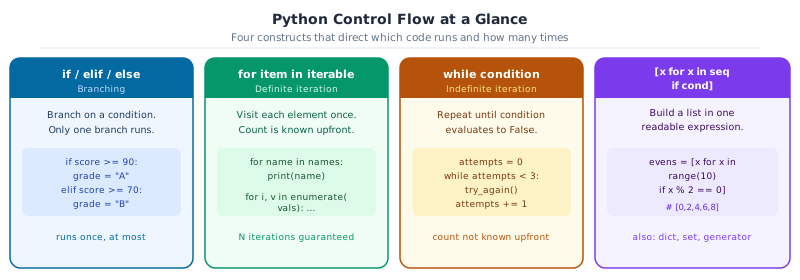
1. Branching with if and elif
So far every cell runs its lines from top to bottom, once, in order. An if statement breaks that pattern: it runs a block of code only when a condition is True. elif adds more branches. else is the fallback when nothing else matched.
Python evaluates each branch from top to bottom and stops at the first one that matches.
Key Concept: if / elif / else
Python stops at the first matching branch. Subsequent elif and else blocks are skipped even if their conditions would also be true. Put the most specific condition first.
Call the function with a score from each grade band to confirm all branches work:
print(classify_grade(95.0))  # A
print(classify_grade(83.5))  # B
print(classify_grade(71.0))  # C
print(classify_grade(62.0))  # D
print(classify_grade(45.0))  # F
A: Excellent
B: Good
C: Satisfactory
D: Needs improvement
F: See instructorThe ternary expression is a one-line shorthand for a simple two-way choice. Read it as: “value if condition, otherwise other_value”:
score = 87.0
status = "pass" if score >= 70 else "fail"
print(f"{score} -> {status}")
87.0 -> passDecision flow: if / elif / else
flowchart TD
    A["evaluate condition"] --> B{if condition1}
    B -->|True| C["execute if block"]
    B -->|False| D{elif condition2}
    D -->|True| E["execute elif block"]
    D -->|False| F{else?}
    F -->|present| G["execute else block"]
    F -->|absent| H["skip all"]
    C & E & G & H --> I["continue program"]

    style C fill:#EBF5F0,stroke:#059669,color:#065F46
    style E fill:#EAF3FA,stroke:#0369A1,color:#0C4A6E
    style G fill:#F5F3FF,stroke:#7C3AED,color:#3B0764
2. Match and case
match / case was added in Python. It goes beyond simple equality: it can inspect the shape of data, extract values from dicts and lists in one step, and apply guard conditions with if.
Use match when you need to route a value to one of several handlers based on its structure. For a simple two-way choice, if / else is clearer.
Define a routing function that handles different types of student records. Each case arm matches a different dict shape:
def process_record(record: dict[str, object]) -> str:
    """Route a student record to the right handler."""
    match record:
        case {"type": "enrolment", "student": s, "gpa": g} if float(str(g)) >= 3.5:
            return f"{s} enrolled: Dean's List eligible (GPA {float(str(g)):.2f})"
        case {"type": "enrolment", "student": s, "gpa": g}:
            return f"{s} enrolled (GPA {float(str(g)):.2f})"
        case {"type": "withdrawal", "student": s, "reason": r}:
            return f"{s} withdrew: {r}"
        case {"type": t}:
            return f"Unhandled record type: {t!r}"
        case _:
            return "Malformed record: missing 'type'"
Run each record through the dispatcher to see a different case arm trigger each time:
enrolment_alice = {"type": "enrolment", "student": "Alice", "gpa": 3.8}
enrolment_bob = {"type": "enrolment", "student": "Bob", "gpa": 2.9}
withdrawal = {"type": "withdrawal", "student": "Carol", "reason": "Medical leave"}
grade_update = {"type": "grade_update"}
malformed = {"student": "Dan"}

print(process_record(enrolment_alice))
print(process_record(enrolment_bob))
print(process_record(withdrawal))
print(process_record(grade_update))
print(process_record(malformed))
Alice enrolled: Dean's List eligible (GPA 3.80)
Bob enrolled (GPA 2.90)
Carol withdrew: Medical leave
Unhandled record type: 'grade_update'
Malformed record: missing 'type'Sequence patterns in match and case
Sequence patterns match lists and tuples by position. case [first, *rest]: binds the first element to first and the remainder to rest. Useful for processing variable-length score records:
def describe_scores(record: list) -> str:
    match record:
        case []:
            return "no scores"
        case [only]:
            return f"single score: {only}"
        case [first, second]:
            return f"two scores: {first} and {second}"
        case [first, *rest] if first >= 90:
            return f"high-starter ({first}) with {len(rest)} more scores"
        case [first, *rest]:
            return f"started at {first}, {len(rest)} more scores"
Call it with records of different lengths to trigger each case arm:
print(describe_scores([]))
print(describe_scores([85]))
print(describe_scores([72, 88]))
print(describe_scores([95, 80, 77]))
print(describe_scores([60, 70, 75, 80]))
no scores
single score: 85
two scores: 72 and 88
high-starter (95) with 2 more scores
started at 60, 3 more scores
Activity 1 - Match on HTTP-style Status Codes
Write a
Write a
describe_status(code) function using match/case that returns a short description.
describe_status(200)  -> '200 OK'
describe_status(404)  -> '404 Not Found'
describe_status(500)  -> '500 Server Error'
describe_status(301)  -> '3xx Redirect'
describe_status(999)  -> 'Unknown code'
Hint: Use case 2xx patterns are not valid. Use guard conditions instead: case c if 200 <= c < 300.
def describe_status(code: int) -> str:
    """Return a short description for an HTTP-style status code."""
    match code:
        case _:
            return "unknown"  # TODO: replace with specific case patterns


for c in [200, 404, 500, 301, 999]:
    print(describe_status(c))
unknown
unknown
unknown
unknown
unknown3. For loops
A for loop repeats a block of code once for each item in a collection. It is the primary tool for processing datasets, iterating over records, and transforming lists.
for score in [78, 85, 92]:   # repeat once per score
    print(score)              # output: 78, then 85, then 92
The indented block (4 spaces) is the loop body: it runs once per item.
Python for loops iterate over any iterable. The built-ins range(), enumerate(), and zip() cover the most common patterns in data work.
Key Concept: enumerate and zip over manual indexing
for i in range(len(items)) is a red flag. Use enumerate(items) when you need both the index and the value, and zip(a, b) when you need to step two collections in lockstep. Both are lazy: they generate pairs on demand without building a temporary list.
range(start, stop, step) generates integers lazily without building a list in memory. Use it to count through students, weeks, or any numbered sequence:
# range(start, stop): count from 1 to WEEKS (inclusive)
WEEKS: int = 5
cumulative: int = 0

for week in range(1, WEEKS + 1):
    new_submissions = week * 12  # 12 new submissions each week
    cumulative += new_submissions
    print(f"  Week {week}/{WEEKS}  new={new_submissions}  total={cumulative}")
Week 1/5 new=12 total=12
Week 2/5 new=24 total=36
Week 3/5 new=36 total=72
Week 4/5 new=48 total=120
Week 5/5 new=60 total=180enumerate() pairs each element with its index, counting from start=1 by default (or any integer you choose), eliminating the need for manual i += 1 counters:
# enumerate(): loop with automatic index; avoids manual counter variables
students: list[str] = ["Alice", "Carol", "Dan", "Bob"]

print("Leaderboard:")
for rank, name in enumerate(students, start=1):
    print(f"  #{rank}  {name}")
Leaderboard:
#1 Alice
#2 Carol
#3 Dan
#4 Bobzip() stitches two or more iterables together element-by-element. Pairs stop when the shortest input is exhausted. Build a dict from two parallel lists using dict(zip(keys, values)):
# zip(): iterate two or more iterables in lockstep
# strict=True raises ValueError if the iterables have different lengths
names: list[str] = ["Alice", "Bob", "Carol"]
scores: list[float] = [92.0, 74.5, 88.0]

print("Score sheet:")
for name, score in zip(names, scores, strict=True):
    grade = "pass" if score >= 70 else "fail"
    print(f"  {name:<8} {score:5.1f}  {grade}")
Score sheet:
Alice 92.0 pass
Bob 74.5 pass
Carol 88.0 passdict(zip(keys, values)) is an idiomatic one-liner for building a mapping from two parallel lists:
# Build a name -> score lookup from two parallel lists
names: list[str] = ["Alice", "Bob", "Carol"]
scores: list[float] = [92.0, 74.5, 88.0]

score_lookup: dict[str, float] = dict(zip(names, scores, strict=True))
print(score_lookup)
{'Alice': 92.0, 'Bob': 74.5, 'Carol': 88.0}tqdm: progress bars for long loops
When a loop processes thousands of records, you need to know how long it will take. tqdm wraps any iterable and displays a live progress bar with elapsed time, rate, and ETA.
Install it first:
uv add tqdmfrom tqdm import tqdm
# Wrap any iterable with tqdm() - the loop body is unchanged
scores: list[float] = []
for i in tqdm(range(1_000), desc="Simulating scores", unit="rec"):
scores.append(50 + (i % 50)) # dummy computation
print(f"Generated {len(scores)} scores, mean = {sum(scores) / len(scores):.1f}")
# tqdm also works with enumerate and zip
labels: list[str] = ["pass" if s >= 70 else "fail" for s in tqdm(scores, desc="Labelling", leave=False)]
print(f"pass rate: {labels.count('pass') / len(labels):.1%}")Generated 1000 scores, mean = 74.5pass rate: 60.0%
Activity 2: cohort score summary
Print a formatted score summary using
Setup:
Steps:
1. Use
2. Use
3. Compute the average of midterm and final for each student.
4. Print:
5. Print the name of the student with the highest average.
Print a formatted score summary using
enumerate and zip.Setup:
students = [“Alice”, “Bob”, “Carol”, “Dan”, “Eve”]midterm = [82.0, 65.0, 91.0, 74.0, 88.0]final = [79.0, 70.0, 94.0, 68.0, 85.0]Steps:
1. Use
zip to pair midterm and final for each student.2. Use
enumerate to add a rank number starting from 1.3. Compute the average of midterm and final for each student.
4. Print:
#1 Alice mid=82.0 final=79.0 avg=80.55. Print the name of the student with the highest average.
4. While loops, break, and continue
A while loop repeats a block as long as a condition is True. Unlike for (which iterates a fixed collection), while runs an indefinite number of times until either the condition becomes False or a break statement is hit.
pending = 24
while pending > 0:    # keep processing until the queue is empty
    pending -= 3      # process 3 records per batch
Use while when you do not know in advance how many iterations you need: retrying a failing operation, reading until end of file, or consuming a queue one batch at a time.
breakexits the loop immediatelycontinueskips the rest of the current iteration and moves to the next
Key Concept: while for indefinite loops, for for known collections
Use for when you know the collection to iterate. Use while when you don’t know how many iterations you need: retrying until success, reading until end of file, or consuming a queue until it is empty. Every while loop needs either a condition that eventually becomes False or an explicit break; otherwise it runs forever.
Process a submission queue in batches until it is empty or the processing budget is exhausted:
# while: consume a queue in fixed-size batches
queue: list[str] = [f"student_{i:03d}" for i in range(1, 18)]  # 17 submissions
processed: int = 0
BATCH: int = 5

while queue:
    batch = queue[:BATCH]
    queue = queue[BATCH:]
    processed += len(batch)
    print(f"  Processed batch of {len(batch):2d}  ({len(queue)} remaining)")

print(f"Total processed: {processed}")
Processed batch of 5 (12 remaining)
Processed batch of 5 (7 remaining)
Processed batch of 5 (2 remaining)
Processed batch of 2 (0 remaining)
Total processed: 17break and continue
break exits the innermost loop immediately. Use it when a sentinel value or error condition means further iteration is pointless:
# break: exit the loop immediately when a sentinel is found
readings: list[float | None] = [36.5, 36.9, 37.4, None, 38.1, 37.8]
clean: list[float] = []

for r in readings:
    if r is None:
        print("Sensor error : stopping collection")
        break
    clean.append(r)

print(f"Clean readings: {clean}")
Sensor error : stopping collection
Clean readings: [36.5, 36.9, 37.4]continue skips the rest of the current iteration and jumps to the next one. Ideal for filtering bad data without a nested if/else. The else clause on a loop runs only if no break occurred:
# continue: skip the rest of this iteration and move to the next
raw: list[object] = [85.0, "n/a", None, 92.0, "", 78.5, -1.0, 95.0]
valid: list[float] = []

for item in raw:
    if not isinstance(item, int | float) or float(str(item)) < 0:
        continue  # skip bad items
    valid.append(float(str(item)))

print(f"Valid scores: {valid}")
Valid scores: [85.0, 92.0, 78.5, 95.0]A loop can have an else clause that runs only when the loop was not exited by break. It is the clean way to handle “found nothing” after a search:
required_fields: list[str] = ["name", "gpa", "major"]
record: dict[str, str] = {"name": "Alice", "gpa": "3.95", "major": "CS"}

for field in required_fields:
    if field not in record:
        print(f"Missing field: {field}")
        break
else:
    print("Record is complete")
Record is complete Activity 3: find the first failing student
Process a list of scores and stop as soon as you find the first score below 60.
Setup:scores = [82.0, 91.0, 74.0, 65.0, 55.0, 88.0, 42.0]
Steps:
1. Use a while loop with an index variable.
2. If the current score is below 60, print the index and score, then break.
3. After the loop, print how many records were checked before the fail was found.
Expected output:First fail at index 4: 55.0Checked 5 records before finding it
The walrus operator
Python added :=, called the walrus operator (it looks like a walrus on its side). It assigns a value and evaluates it in the same expression.
Its natural home is a while loop that needs to read and test in one step:
# Without walrus: assign before the loop, update at the end
line = f.readline()
while line:
    process(line)
    line = f.readline()     # easy to forget this update

# With walrus: read and check in one expression
while line := f.readline():
    process(line)
import io
# Simulate a file of student records
data = io.StringIO("Alice,92\nBob,74\nCarol,88\n")
# walrus: read a line and check it is non-empty in one expression
while line := data.readline():
name, score = line.strip().split(",")
print(f" {name}: {score}") Alice: 92
Bob: 74
Carol: 88 Key Concept: walrus := assigns and returns
:= assigns to the left-hand variable and returns the assigned value. Use it when you would otherwise write “assign, then check” at the top of a loop and “assign again” at the bottom. Overuse hurts readability; save it for the while (value := read_something()): pattern.
5. Comprehensions
A comprehension builds a new collection by transforming or filtering an existing one, all in a single expression. It replaces the verbose for + .append() pattern:
# Loop version (3 lines):
squares = []
for n in range(5):
    squares.append(n ** 2)   # [0, 1, 4, 9, 16]

# Comprehension (1 line, identical result):
squares = [n ** 2 for n in range(5)]
Comprehensions are faster than equivalent loops and are considered idiomatic Python.
Key Concept: Concise, Readable Collection Construction
Comprehensions build new collections by transforming or filtering an iterable in a single expression. They are faster than equivalent for + .append() loops and are idiomatic Python.
| [expr for x in it if cond] | list |
| {k: v for x in it if cond} | dict |
| {expr for x in it if cond} | set |
| (expr for x in it if cond) | generator (lazy, no list in memory) |
Key Concept: Comprehensions are for simple transformations; loops are for complex logic
A list comprehension [f(x) for x in items if cond(x)] is readable when the filter and transform are each one expression. When you need multiple steps, early returns, or side effects, write a for loop. Nested comprehensions beyond two levels hurt readability: that’s the signal to refactor.
Transform a list with a comprehension: min-max normalise scores to the range [0, 1]:
raw_scores: list[float] = [78.0, 85.5, 92.0, 88.5, 95.0, 67.0, 81.0]

lo, hi = min(raw_scores), max(raw_scores)
normed: list[float] = [(s - lo) / (hi - lo) for s in raw_scores]
print(f"Normalised: {[round(n, 2) for n in normed]}")
Normalised: [0.39, 0.66, 0.89, 0.77, 1.0, 0.0, 0.5]Filter with a comprehension: keep only the passing scores:
raw_scores: list[float] = [78.0, 85.5, 92.0, 88.5, 95.0, 67.0, 81.0]

passing: list[float] = [s for s in raw_scores if s >= 70]
print(f"Passing: {passing}")
Passing: [78.0, 85.5, 92.0, 88.5, 95.0, 81.0]Combine filter and transform in one comprehension: attach a pass/fail label to each score:
raw_scores: list[float] = [78.0, 85.5, 92.0, 88.5, 95.0, 67.0, 81.0]

labels: list[str] = [f"{s:.0f} (pass)" if s >= 70 else f"{s:.0f} (FAIL)" for s in raw_scores]
print(f"Labelled: {labels}")
Labelled: ['78 (pass)', '86 (pass)', '92 (pass)', '88 (pass)', '95 (pass)', '67 (FAIL)', '81 (pass)']A two-clause comprehension flattens a nested collection. Read [s for batch in batches for s in batch] left-to-right: “outer loop, inner loop, collect s”:
# Flatten a nested structure with a two-clause comprehension
batches: list[list[float]] = [[85.0, 91.0], [74.0, 88.5], [95.0, 79.0]]
flat: list[float] = [s for batch in batches for s in batch]
print(f"Flattened : {flat}")
Flattened : [85.0, 91.0, 74.0, 88.5, 95.0, 79.0]Dict, set, and generator comprehensions
The [...] syntax extends to dicts ({k: v for ...}), sets ({expr for ...}), and lazy generators ((expr for ...)):
students: list[dict[str, object]] = [
    {"name": "Alice", "score": 92.0, "major": "CS"},
    {"name": "Bob", "score": 74.5, "major": "Math"},
    {"name": "Carol", "score": 88.0, "major": "CS"},
    {"name": "Dan", "score": 61.0, "major": "Physics"},
]

# Dict comprehension: build a name -> score lookup
score_lookup: dict[str, float] = {str(s["name"]): float(str(s["score"])) for s in students}
print(f"Lookup : {score_lookup}")

# Dict comprehension with filter: honours students only
honours: dict[str, float] = {str(s["name"]): float(str(s["score"])) for s in students if float(str(s["score"])) >= 80}
print(f"Honours: {honours}")
Lookup : {'Alice': 92.0, 'Bob': 74.5, 'Carol': 88.0, 'Dan': 61.0}
Honours: {'Alice': 92.0, 'Carol': 88.0}A set comprehension {expr for x in it} automatically deduplicates the results:
students: list[dict[str, object]] = [
    {"name": "Alice", "score": 92.0, "major": "CS"},
    {"name": "Bob", "score": 74.5, "major": "Math"},
    {"name": "Carol", "score": 88.0, "major": "CS"},
    {"name": "Dan", "score": 61.0, "major": "Physics"},
]

# Set comprehension: unique majors (duplicates removed automatically)
majors: set[str] = {str(s["major"]) for s in students}
print(f"Majors: {sorted(majors)}")
Majors: ['CS', 'Math', 'Physics']A generator expression (expr for x in it) computes values lazily: it uses O(1) memory regardless of input size. Pass one directly to sum(), any(), or all() to avoid building a temporary list:
students: list[dict[str, object]] = [
    {"name": "Alice", "score": 92.0, "major": "CS"},
    {"name": "Bob", "score": 74.5, "major": "Math"},
    {"name": "Carol", "score": 88.0, "major": "CS"},
    {"name": "Dan", "score": 61.0, "major": "Physics"},
]

total: float = sum(float(str(s["score"])) for s in students)
print(f"Mean          : {total / len(students):.1f}")
Mean : 78.9The same logic as a loop, written as a list comprehension:
students: list[dict[str, object]] = [
    {"name": "Alice", "score": 92.0, "major": "CS"},
    {"name": "Bob", "score": 74.5, "major": "Math"},
    {"name": "Carol", "score": 88.0, "major": "CS"},
    {"name": "Dan", "score": 61.0, "major": "Physics"},
]

# any() and all() short-circuit: they stop as soon as the answer is known
any_fail: bool = any(float(str(s["score"])) < 70 for s in students)
all_pass: bool = all(float(str(s["score"])) >= 60 for s in students)
print(f"Any fail (<70): {any_fail}")
print(f"All pass (>=60): {all_pass}")
Any fail (<70): True
All pass (>=60): True
Activity 4 - Cohort Score Report
Using a single comprehension for each, produce the outputs below from
Using a single comprehension for each, produce the outputs below from
records.
records = [
    {'name': 'Alice', 'scores': [88, 92, 85]},
    {'name': 'Bob',   'scores': [62, 70, 58]},
    {'name': 'Carol', 'scores': [91, 95, 89]},
]

# 1. List of averages (one float per student)
averages = [82.33, 63.33, 91.67]

# 2. Dict mapping name -> average (rounded to 2 dp)
avg_map = {'Alice': 88.33, 'Bob': 63.33, 'Carol': 91.67}

# 3. Set of unique student names who scored >= 80 average
top = {'Alice', 'Carol'}
records: list[dict[str, object]] = [
    {"name": "Alice", "scores": [88, 92, 85]},
    {"name": "Bob", "scores": [62, 70, 58]},
    {"name": "Carol", "scores": [91, 95, 89]},
]

# TODO: 1. list of averages
averages: list[float] = ...

# TODO: 2. name -> average dict
avg_map: dict[str, float] = ...

# TODO: 3. set of names with average >= 80
top: set[str] = ...

print(f"averages: {averages}")
print(f"avg_map : {avg_map}")
print(f"top     : {top}")
averages: Ellipsis
avg_map : Ellipsis
top : Ellipsisitertools.batched() (Python) splits any iterable into fixed-size chunks without loading everything into memory. It replaces manual sliding-window loops in data pipelines.
from itertools import batched

student_ids = list(range(1, 22))  # 21 students

for batch_num, batch in enumerate(batched(student_ids, 5), start=1):
    print(f"Batch {batch_num}: {list(batch)}")
Batch 1: [1, 2, 3, 4, 5]
Batch 2: [6, 7, 8, 9, 10]
Batch 3: [11, 12, 13, 14, 15]
Batch 4: [16, 17, 18, 19, 20]
Batch 5: [21] Pro Tip: batched() for Chunked Processing
batched(iterable, n) yields tuples of at most n items. The last batch may be shorter. Use it for API rate-limiting, mini-batch gradient descent, or processing large CSV files in chunks: for rows in batched(csv_reader, 1000): process(rows).
Capstone: processing a student record set
This activity brings together everything from Chapters 1 and 2. You will read a list of student records that simulates a CSV file, classify each student, search for a specific one, and build a cohort summary using a comprehension.
The four control flow constructs work together here: if/elif to classify, for to iterate, while to search, and a comprehension to summarize.
Step 1: Set up the records. csv.DictReader and io.StringIO let you parse a CSV string without a file on disk:
import csv
import io

CSV_DATA = (
    "name,score,year\nAlice,92.5,2\nBob,74.0,3\nCarol,88.0,1\nDan,61.5,2\nEve,95.0,3\nFiona,55.0,1\nGeorge,78.0,2\n"
)

reader = csv.DictReader(io.StringIO(CSV_DATA))
records: list[dict[str, object]] = [
    {"name": row["name"], "score": float(row["score"]), "year": int(row["year"])} for row in reader
]
print(f"Loaded {len(records)} student records")
print(records[0])
Loaded 7 student records
{'name': 'Alice', 'score': 92.5, 'year': 2}Step 2: Define a grading function using if/elif/else:
def classify(score: float) -> str:
    if score >= 90:
        return "distinction"
    elif score >= 70:
        return "pass"
    else:
        return "fail"
Step 3: Use a for loop to classify every student and print a formatted table:
print(f"{'Name':<10} {'Score':>6}  {'Grade':<12}  Year")
print("-" * 38)
for rec in records:
    grade = classify(float(str(rec["score"])))
    print(f"{str(rec['name']):<10} {float(str(rec['score'])):>6.1f}  {grade:<12}  {rec['year']}")
Name Score Grade Year
--------------------------------------
Alice 92.5 distinction 2
Bob 74.0 pass 3
Carol 88.0 pass 1
Dan 61.5 fail 2
Eve 95.0 distinction 3
Fiona 55.0 fail 1
George 78.0 pass 2Step 4: Use a while loop to find the first distinction student without scanning the whole list:
idx: int = 0
first_distinction: dict[str, object] | None = None

while idx < len(records):
    rec = records[idx]
    if float(str(rec["score"])) >= 90:
        first_distinction = rec
        break
    idx += 1

if first_distinction:
    print(f"First distinction: {first_distinction['name']} ({first_distinction['score']})")
else:
    print("No distinction students found")
First distinction: Alice (92.5)Step 5: Use comprehensions to build the cohort summary in three lines:
grades: list[str] = [classify(float(str(r["score"]))) for r in records]

grade_counts: dict[str, int] = {g: grades.count(g) for g in ["distinction", "pass", "fail"]}
print(f"Grade distribution: {grade_counts}")
Grade distribution: {'distinction': 2, 'pass': 3, 'fail': 2}The same logic as a loop, written as a list comprehension:
top_students: list[str] = [str(r["name"]) for r in records if float(str(r["score"])) >= 80]
print(f"Top students (>=80): {top_students}")
Top students (>=80): ['Alice', 'Carol', 'Eve']Continuing from the previous cell:
mean_score: float = sum(float(str(r["score"])) for r in records) / len(records)
print(f"Cohort mean: {mean_score:.1f}")
Cohort mean: 77.7
What you used in this capstone
-
if / elif / else: the
classify()function routes each score to a grade band - for loop: iterating over every record to print the full table
- while + break: stopping the search as soon as the first distinction is found
- Comprehensions: building grade counts, top-student lists, and a running total each in one expression
- Walrus (:=): reading records line by line in the earlier section
These four constructs cover nearly every control flow situation you will encounter in data work.
Further reading
| Resource | Why it matters |
|---|---|
| PEP 636: Structural Pattern Matching | Official tutorial for match/case, with worked examples from the Python core team |
| Ramalho, L. (2022). Fluent Python, 2nd ed. O’Reilly. | Chapter 16 covers pattern matching in depth, including class patterns and guards |
Real Python: Python for Loops |
Clear treatment of enumerate, zip, and the iterator protocol behind every loop |
| Real Python: List Comprehensions | When to use comprehensions vs explicit loops, and how to avoid making them unreadable |
Summary
| Concept | Key rule |
|---|---|
if / elif / else |
Evaluate top to bottom; stop at the first match |
match / case |
Structural pattern matching on values, dicts, and lists |
enumerate / zip |
Always prefer these over manual index counters |
while / break / continue |
For indefinite loops, early exit, and skipping bad data |
:= walrus |
Assign and test in one expression; natural in while line := f.readline(): |
| Comprehensions | [expr for x in it if cond]; use generators (...) inside sum() / any() / all() |
Next: 03-functions.ipynb: functions, default arguments, *args/**kwargs, and docstrings., default arguments, *args/**kwargs, and writing docstrings.